
How We Transformed a 30+ Table Recruiting System From Excel Spreadsheet Pain to Airtable Intelligence [Real Case Study]
A recruiting firm ran on 30+ linked Excel sheets that broke with every deleted row. Here is how we rebuilt the whole system in Airtable around one stable key.
- Business
- Case Study

In short
- A recruiting company ran on 30+ interconnected Excel sheets, and one deleted row could break formulas in all of them.
- Excel is not a database: it cannot enforce structure, unique IDs or clean data, and it cannot automate anything on its own.
- Moving the data into Airtable is not enough. Copying a broken spreadsheet creates a broken Airtable base.
- We rebuilt the system around one stable ID, the Candidate ID, with one parent table and 30+ child tables linked to it.
- Automations only create the links between records. Lookup fields do the rest, so the data cannot drift apart.
A recruiting company came to us with 30+ Excel sheets, thousands of rows and a system that one deleted row could break. Fixing a single mistake took three people two days.
Excel and Google Sheets are great for ideas and early operations. Once you have several teams, dozens of workflows and information flowing between departments, spreadsheets stop helping and start breaking things.
This is the real story of how we moved that operation into Airtable. It covers the mistakes we corrected, the architecture we built, the mindset shift Airtable demands, and what you can copy for your own business.
Why a 30+ sheet Excel system is a house of cards
The client had dozens of VLOOKUPs, manually copied values, a separate tab for each workflow phase and hundreds of fields for the same people. On the surface it looked organized. Underneath, it was waiting to fall.
Excel is not a database. It does not understand relationships, enforce structure, guarantee uniqueness or protect data integrity. That leads to six problems.
1. Formulas break when rows move
VLOOKUP, MATCH and INDEX all depend on stable row positions. Delete a row and everything breaks. Insert one and everything shifts. Sort incorrectly and accuracy is gone.
Our client had built long VLOOKUP chains across several workbooks. When a recruiter deleted what looked like a "duplicate" candidate row, the damage cascaded into 30+ sheets.
2. Excel cannot handle multi-table relationships
You cannot tell Excel "this candidate belongs to this record in another table." You approximate it with VLOOKUP, filtering and manual cross-referencing. Our client had built a web of dependencies:
- Candidates Sheet held the basic information
- Status Sheet tracked recruitment phases
- Documents Sheet managed passport, visa, certificates
- Training Sheet recorded completion dates
- Travel Sheet handled flight bookings
- Placement Sheet tracked job assignments
- Salary Sheet calculated payments
- Compliance Sheet monitored legal requirements
- And more
Each sheet referenced the others through formulas. When one sheet changed structure (someone added a column, say), formulas in six other sheets broke. The team lost hours every week hunting down #REF! and #N/A errors.
3. Copy-paste creates silent errors
A team member can paste over a CndID, a phone number, a date or a status, and Excel will never warn them. It has no guardrails.
Each error meant detective work to find the correct information. Some data was lost for good.
4. There is no automation you can trust
Excel has no native triggers, no automated record creation and no reliable way to pass data across sheets. The client had tried to compensate with nested IF statements, cell references across dozens of sheets, conditional formatting as "alerts" and recorded macros.
Formulas can calculate and display data. They cannot create records or trigger workflows. Every action needed a person, which meant bottlenecks and mistakes.
5. Data validation is nearly impossible
A spreadsheet cannot insist that every record has a unique ID, that dates follow one format or that a status comes from a fixed list. We found candidates with:
- Status values like "almost done," "finish soon," "waiting, I think"
- Dates entered as "next week" or "June maybe"
- Phone numbers in five different formats
- Names with inconsistent capitalization and spacing
Every report needed manual cleanup first.
6. Operational risk grows with the business
More clients means more data, more data means more formulas, and more formulas mean more breakage. By the time we met them, the system was too big for spreadsheets, too complicated to maintain, too fragile to scale and too risky for daily operations.
They could not train new recruiters because the system was too complex. They lost opportunities because finding data took too long. They made costly mistakes because information was inconsistent.
Airtable is a relational database, not a nicer spreadsheet
When businesses hear "Airtable," they think of a prettier spreadsheet. That is wrong. Airtable is a relational database with a spreadsheet-like interface. It offers:
| Feature | What it does for you |
|---|---|
| Linked records | Connects records across tables with real relationships, not formula approximations |
| Lookup fields | Pulls any field from a connected record automatically |
| Rollup fields | Calculates sums, counts and averages across linked records |
| Views | Gives you unlimited filtered views of the same data without duplicating anything |
| Automations | Runs reliable no-code automations that survive structural changes |
| Field types | Enforces data integrity (email, phone, date, single select and more) |
| Permissions | Controls who can view, edit or comment on specific tables and fields |
They write VLOOKUP-style formulas, link records by hand and rely on physical row numbers. Airtable cannot work this way. You have to think like a database designer, not a spreadsheet user.
Relationships instead of references
In Excel you reference cells: =VLOOKUP(A2, Sheet2!A:B, 2, FALSE). In Airtable you link records. You tell the system that this candidate record is connected to this placement record, and from then on the information flows through lookup and rollup fields.
This is the mindset shift most teams miss. None of the features above matter without the right architecture, so here is how we fixed it for our client.
The fatal flaw: no stable primary key
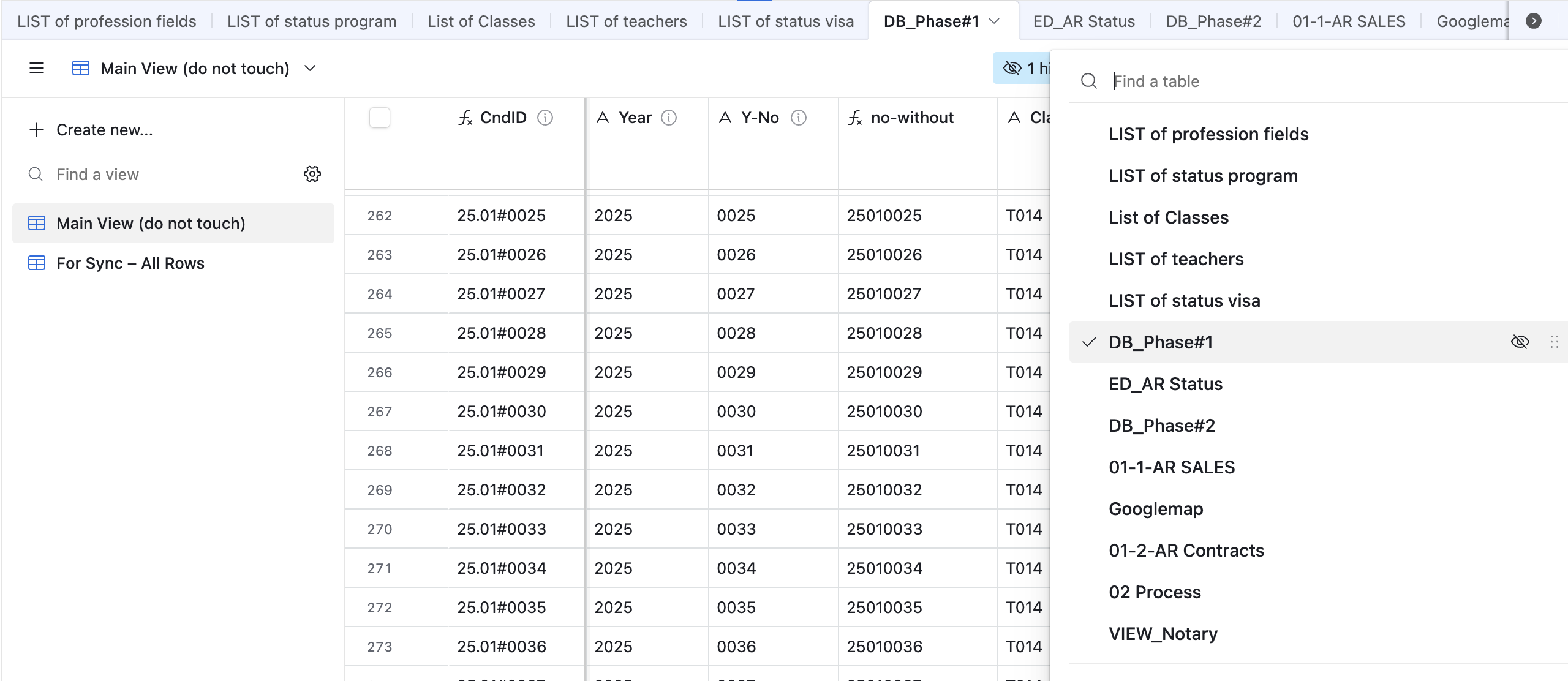
When we opened the client's Airtable base for the first time, the structure looked familiar: Candidates, Status, Documents, Training, Travel, Placement, Salary, Compliance and dozens more tables, each needing data from the others.
There was one fatal flaw: no universal, stable primary key. Instead they used PH1_Row, the physical row number, which changes whenever a record is deleted. That is how formulas break, automations break and relationships collapse.
A primary key is a unique identifier that:
- Never changes
- Exists for every record
- Is never duplicated
- Has business meaning
Physical row numbers fail on all four counts. The fix was already in the client's own data: the Candidate ID (CndID), for example 23.01#0047. It holds the year (23 for 2023), the month (01 for January) and a sequential number (#0047). It was unique, meaningful and already assigned to every candidate.
We made CndID the universal primary key across all 30+ tables. That one decision changed everything.
One key, one parent table, 30+ child tables
Every table gets a CndID column, no exceptions. DB_Phase#1 becomes the source of truth and all other tables receive CndID from it. Airtable links records through CndID, lookup fields pull every other field, and the VLOOKUPs, manual copy-paste and PH1_Row errors are gone.
The parent-child hierarchy
Parent table: DB_Phase#1 holds the core candidate information: name, contact details, nationality, date of application. It is the only place this information is stored.
Child tables (30+ in total) include:
- ED_AR Status (recruitment phase tracking)
- Documents (passport, certificates, visa)
- Training (completion dates, certificates)
- Travel (flights, accommodation)
- Placement (job assignments, companies)
- Salary (payments, deductions)
- Compliance (legal documents, expiry dates)
- And others
Each child table has four things:
- A CndID field (text field, primary key)
- A link to DB_Phase#1 (linked record field)
- Lookup fields pulling Name, Phone, Email and so on
- Table-specific fields (status, dates, notes unique to that table)
Why this architecture works
- Single source of truth. Core candidate information exists in exactly one place. Change it once and it updates everywhere.
- No duplication. Names, phone numbers and email addresses are looked up from the parent table, never copied.
- Automatic consistency. If a name changes (marriage, correction), you update DB_Phase#1 and every table reflects it instantly.
- Scalability. A new process means a new table with CndID and a link to the parent. Done.
- Error prevention. You cannot accidentally paste over a looked-up field, because lookup fields are read-only.
- Audit trail. Airtable tracks who changed what and when in the parent table.
This is the foundation of every successful Airtable system.
Automation A: syncing 300+ existing records in 90 seconds
We had 300+ existing candidates in DB_Phase#1 and needed them to appear automatically in ED_AR Status, the Training tables, Accommodation, Contract and every other table. Linking them manually would take days, writing 30+ automations would be insane, and CSV imports would create duplicates.
Our first attempt was a single automation. Trigger: when CndID exists in DB_Phase#1. Action: create a new record in ED_AR Status (and the other tables) with the same CndID. That only worked for new records. The 300+ existing candidates would never trigger it.
Here is exactly what we did:
- Selected the entire CndID column in DB_Phase#1 (300+ cells)
- Copied it to the clipboard (Ctrl+C)
- Deleted all content (Delete key)
- Pasted it straight back (Ctrl+V)
- Watched the automation fire 300+ times in 90 seconds
What normally takes hours became a 2-second trick, and all 300+ records landed in every child table.
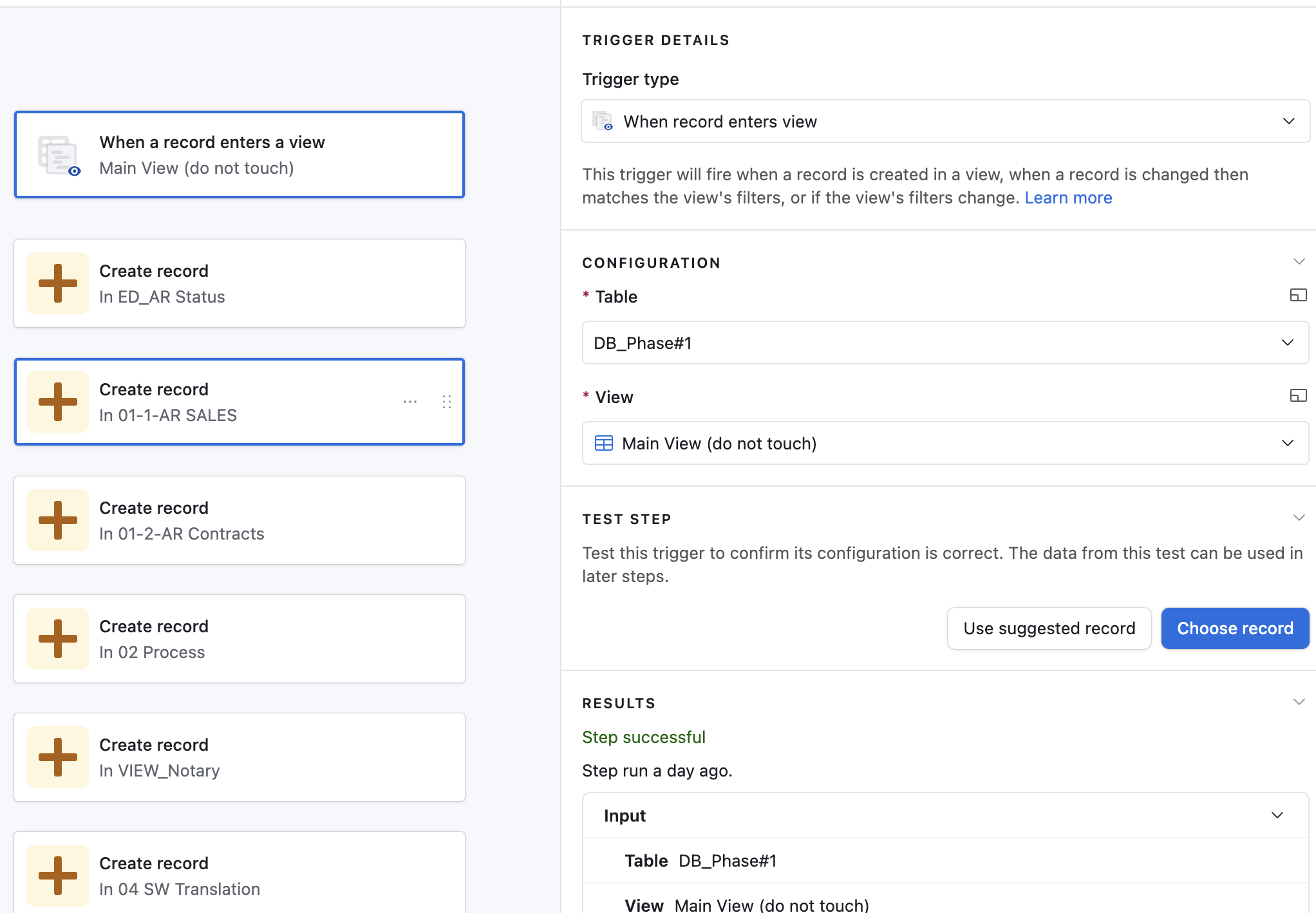
By deleting and repasting, we forced a "change event" even though the final values were identical. The same technique became our secret weapon for backfilling tables added later, re-syncing tables that drifted out of sync and testing automations at scale.
Automation B: new candidates sync themselves
Migration is only step one. The system also has to work for the future, so we built Automation B. Trigger: a new record is created in DB_Phase#1. Action: a record with the same CndID is generated in the child table.
Now every new candidate fills all linked fields and updates all lookups on its own. No manual syncing, no formulas, no risk of missing values and no dependency on row numbers.
Five automation habits we learned
- Keep automations simple. Each one does one thing well. Multi-step automations are harder to debug.
- Use conditions wisely. Add filters such as "only run if status = X" to prevent wasted runs.
- Test incrementally. Build one automation, test it thoroughly, then build the next.
- Document everything. We keep a separate "Automations Guide" table listing every automation, what it does and when it runs.
- Watch the log. Airtable shows automation history, and we check it weekly for failures.
Automations create links, lookups move the data
Most Airtable beginners update fields directly, build VLOOKUP formulas, sync data by hand, recreate Excel logic and patch the holes with automations.
In the new system CndID is stored only in DB_Phase#1, and every other table has a lookup field pulling it. No automation is needed to sync the CndID, so it is impossible for the data to become inconsistent. Automations only create the initial link. Lookups handle everything else.
Seven mistakes Excel users make, and how Airtable fixed them
| Mistake | The problem in Excel | How Airtable fixed it |
|---|---|---|
| 1. Row numbers as IDs | Formulas referenced "row 47" and "the 12th entry" and broke whenever rows were deleted or sorted | A stable business ID (CndID) as the primary key. Records keep their identity however you sort or filter |
| 2. VLOOKUP to connect data | Dozens of formulas like =VLOOKUP(A2, Documents!A:Z, 5, FALSE) broke when columns moved or sheets were renamed | Linked records and lookup fields. Link once, pull any field. Structure changes break nothing |
| 3. Copying data across sheets | Each new candidate needed 15-20 minutes of copy-paste across 30+ sheets, often forgotten and always error-prone | Automations create linked records instantly and lookups pull the information. No manual work, no errors |
| 4. Duplicated information | Names in 20+ sheets and phone numbers in 15+. One correction meant manual updates in 5-10 places | A single source of truth in DB_Phase#1 and two other main tables. Update once and it propagates everywhere |
| 5. Nested formulas for business logic | Formulas like =IF(A2="", "", IF(VLOOKUP(A2, Sheet2!A:B, 2, FALSE)="Active", "Process", "Wait")) were fragile and broke constantly | Properly linked record fields. Formulas only for simple math (age from birth date, days until expiry). Links define relationships, formulas do math |
| 6. No primary key validation | Some candidates had no CndID and some had malformed IDs. Nothing prevented it | CndID is required in every table, plus a validation view showing missing or malformed IDs and a weekly check |
| 7. No audit trail | Nobody knew who changed data, when, or what it was before | Airtable tracks every change: who edited which field, when and the previous value |
What the client has now
Excel is an incredible tool, but it was never meant to run 30+ interconnected workflows. Airtable is the modern answer, only if you build it with a proper architecture. Our recruiting client now has:
- Reliable data they can trust
- Real-time status tracking across all processes
- Automated updates that do not fail
- Reduced operational risk
- Complete operational clarity
The biggest change is not technical. The business now operates differently.
Your move: eight steps before you migrate anything
- Audit your current system. Understand the pain points before migrating.
- Identify your primary key. Find the unique identifier that connects everything.
- Design the architecture first. Do not just copy data, redesign the relationships.
- Build a parent-child hierarchy. One source of truth with child tables.
- Use linked records, not formulas. Let Airtable handle relationships.
- Automate links, not data. Automations create connections, lookups move data.
- Test incrementally. One table and one automation at a time.
- Train your team. Database thinking is different from spreadsheet thinking.
Start with step 1 this week: list every sheet your team depends on and write down which ones break when a row is deleted.
Questions and answers
Why do Excel and Google Sheets stop working as a business grows?
Excel is excellent for fast entry and simple calculations, but it is not a database. It does not understand relationships, enforce structure, guarantee unique IDs or protect data integrity, so formulas such as VLOOKUP break whenever rows move or are deleted.
Is Airtable just a nicer spreadsheet?
No. Airtable is a relational database with a spreadsheet-like interface. It links records across tables, pulls data automatically through lookup and rollup fields and runs automations, but only if the architecture is designed for it.
What is a primary key and why does it matter in a migration?
A primary key is a unique identifier that never changes, exists for every record, is never duplicated and has business meaning. In our case study the Candidate ID (CndID) became the universal key across all 30+ tables, replacing physical row numbers that changed whenever a row was deleted.
What should automations do in an Airtable system?
They should create links between records, not move data. Once records are linked, lookup fields and rollups pull and summarise the data, so information stays consistent and cannot drift apart.