
How a Real Estate Agency Was Losing Clients Despite Having Plenty of Leads
An agency got dozens of enquiries a day and still lost clients. What went wrong, the six automations we built, and a ten-step playbook for your own agency.
- Business
- Case Study

In short
- The agency had no shortage of leads: forms were filled out dozens of times a day. It lost clients because the system was not built for that growth.
- A Google Sheets file with more than 10 tabs, chaotic notes and duplicate calls were the symptoms. Moving to Airtable alone would have repeated them, so we changed the structure: one main table per property type.
- Six solutions: a structured database, duplicate detection, a standard first-contact note, an AI client profile with strategy and questions, a daily priority email, and a monthly KPI report.
- Result: faster first contact, far fewer missed follow-ups, no more duplicate calls, and more enquiries turning into viewings and meetings.
- The rule we give other agencies: automate mechanical tasks, not sales.
Your ad campaigns bring in forms dozens of times a day, and a part of those potential clients is still lost for good. That is what was happening at a real estate agency we worked with.
Most agencies believe their main problem is a lack of clients for the properties they offer. This agency had the opposite problem. The database was growing, and agents had more than enough work.
And yet the problem wasn't a lack of interest or demand. The system wasn't prepared for the growth.
I won't talk about theory here. I'll show you what the situation looked like before we started, where the gaps were, what risks the structure was hiding, and why Google Sheets (Google's online spreadsheets) was no longer enough. Then I'll walk you through the six solutions my team and I built, from restructuring the database and migrating to new software to automations and a dashboard for analytics.
Where the leads were leaking
The first three problems all come from the same place: nobody could keep up with the volume.
1. Losing leads as volume grew
As the number of leads in the database increased:
- Some potential clients were never called in time
- There was no clear mechanism for follow-up calls
- When an agent finally reached a client they'd spoken to before, too much time had passed, and the client was already gone
- Some leads were buried in the database and lost permanently
This led to direct financial losses for the agency.
2. No standardized process for working with leads
The agents:
- Relied on memory and personal organization
- Had defined procedures but rarely followed them, often forgetting to collect specific information from clients
- Didn't follow a unified logic when entering information into the database, and the growing chaos slowed their work down further
There was no order or discipline in day-to-day actions.
3. Chaotic and unstructured database entries
After the audit, it became clear that:
- Different agents filled in information in different ways
- There were no clear rules about what to record or how
- The data was difficult to analyze or use further down the line
- The database wasn't functioning as a reliable source of truth
This made accountability and analysis almost impossible.
Why one spreadsheet could not hold ten campaigns
The next four problems come from the tool and the way it was used.
4. Using Google Sheets as the primary database
The state of things before the project:
- Potential clients were collected from various advertising campaigns
- Everything lived in a single file with separate tabs for each campaign
- The number of tabs grew over time, eventually exceeding 10
- There was no centralized control
- Google Sheets was being used as a CRM (a system for managing clients), which introduced serious structural limitations
5. Duplicate clients and multiple calls to the same person
It doesn't take long to figure out what happens when you're running 10 or more ad campaigns and one person fills out forms from several of them. That data lands in different tabs, which inevitably leads to duplicate records.
6. No centralized performance visibility
Before we started the project, the agency owners were dealing with the following:
- Agent performance data was spread across more than 10 spreadsheets
- There were no automated reports; everything had to be done manually
- There was no visualization
- Decisions were made on gut feeling, not data
So the owner asked us to build a dashboard that would analyze and visualize everything they needed. With it in place, they gained:
- A clear picture of the monthly company performance
- Visibility into each individual agent's results
- Comparison against monthly KPI targets (the numbers each agent is expected to reach)
- Analysis for any selected time period
7. No automation of repetitive daily tasks
Agents were wasting time:
- Manually tracking new potential clients
- Manually checking for duplicate records
- Manually organizing their workload
This reduced their effectiveness and their capacity for actual client work.
The leads were fine, the system was not
This agency wasn't struggling to attract potential clients. It was struggling with:
- Lack of structure
- Lack of control
- Lack of standards
- Lack of visibility
- Dependence on human memory
- Decentralized data
The business was growing, but the system wasn't built to handle that growth. Fix the system and the leads you already pay for start to count.
What we built, problem by problem
Here is the map before the details. Each row points to the solution that follows.
| Problem | What we built |
|---|---|
| Leads not called in time, no follow-up mechanism | A daily priority email for each agent (Solution 5) |
| Notes written in every agent's own way | A first-contact form that builds one standard comment (Solution 3) |
| No clear picture of the client or plan for the next call | An AI client profile, strategy and key questions (Solution 4) |
| One Google Sheets file with a tab per campaign | A structured database, moved to Airtable with three main tables (Solution 1) |
| Duplicate clients and repeated calls | A duplicate-detection script that ignores old records (Solution 2) |
| No view of results | The dashboard from problem 6, plus a monthly report per agent (Solution 6) |
Solution 1: Structure first, then migrate, then centralize
Our first step was to restructure the existing database in Google Sheets. We added new columns to introduce clear standards for how information was recorded. Some were designed to be filled in automatically through automations, and others were intended for later analysis and performance measurement.
The goal was simple: make the data consistent, measurable, and usable.
Only after the database was properly structured was the client in a position to take the next logical step: migrating to more serious software. That's when we moved the entire database into Airtable (an online database with a friendlier, spreadsheet-like interface).
The problem that surfaced in Airtable
On the surface, everything looked solved. The data was more organized, the interface was friendlier, and the capabilities were greater.
But a new structural risk emerged. The database continued to grow using the same model it had started with in Google Sheets: a separate table for each advertising campaign.
That meant:
- Every new ad campaign required a new table
- Automations would have to work across a growing number of tables, slowing them down
- Information remained just as scattered as before
- Control was becoming increasingly complex
This model wasn't sustainable.
So I requested a meeting with the agency owner. I explained that if they continued down this path, in a few months they'd find themselves in the exact same situation, just in a more modern piece of software.
The problem wasn't the tool we'd chosen. The problem was the architecture and the way they worked.
The strategic decision: centralizing the tables
We proposed restructuring the advertising campaigns and the database itself. Instead of a separate table for each campaign, we created:
- One primary table for apartment advertising campaigns
- One primary table for house advertising campaigns
- One "Referrals" table, added at the client's explicit request
This way, all potential clients, regardless of which specific ad they came from, began flowing into the same logical structure based on property type. That brought easier database management, fewer points of risk, simpler automations, better visibility, and easier maintenance going forward.
This was the first real breakthrough in the project. From that point on, we were building on a stable foundation.
Solution 2: A script that catches duplicates and ignores old records
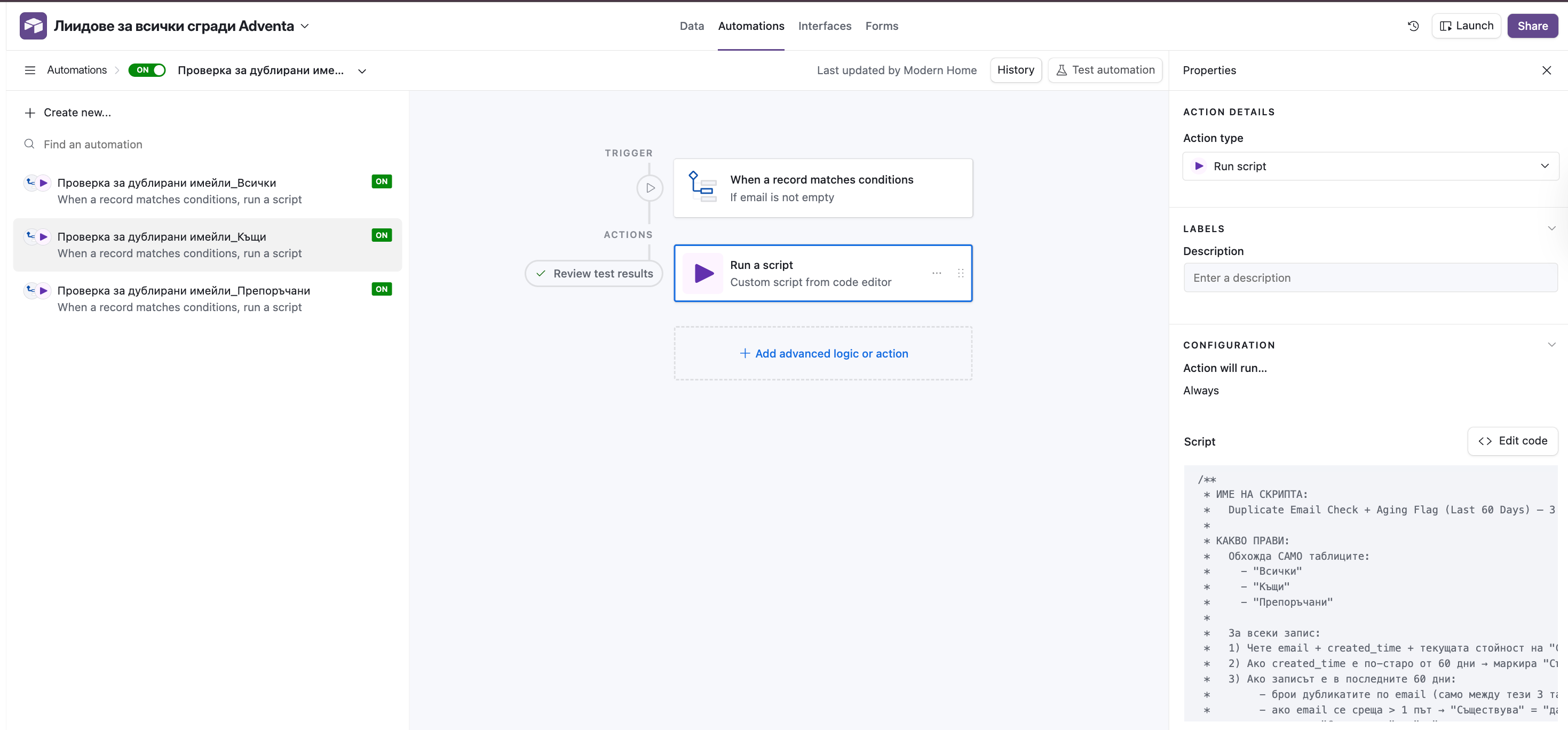
This solution addressed two problems at once.
The first was client duplication across different tables. The same person could fill out forms from several different ads and end up in more than one table.
The result was unpleasant for both the client and the agency. Different agents called the same person, which looked unprofessional and destroyed trust before any real work had even begun.
The second problem was the "noise" from old clients. When a database grows for months, it inevitably fills up with hundreds of records that are no longer relevant. If you let those records take part in the duplicate check, you start getting false signals.
If a client filled out a form seven months ago and now fills out a new one, that's a new opportunity for the business, but the system sees it as a "duplicate." That's a different situation and needs to be treated differently.
So we built an internal automation script in Airtable that runs exclusively across the three main tables the agency uses daily: "Apartments," "Houses," and "Referrals."
Why this matters in this project
In this agency, potential clients were coming in from many different ads. That's normal for a growing business, but it's dangerous without a control mechanism in place.
The script was the first layer of control. Once it was in place, we could build on it with confidence, knowing the incoming flow was no longer "contaminated" by duplicates.
Solution 3: One form, one standard first comment
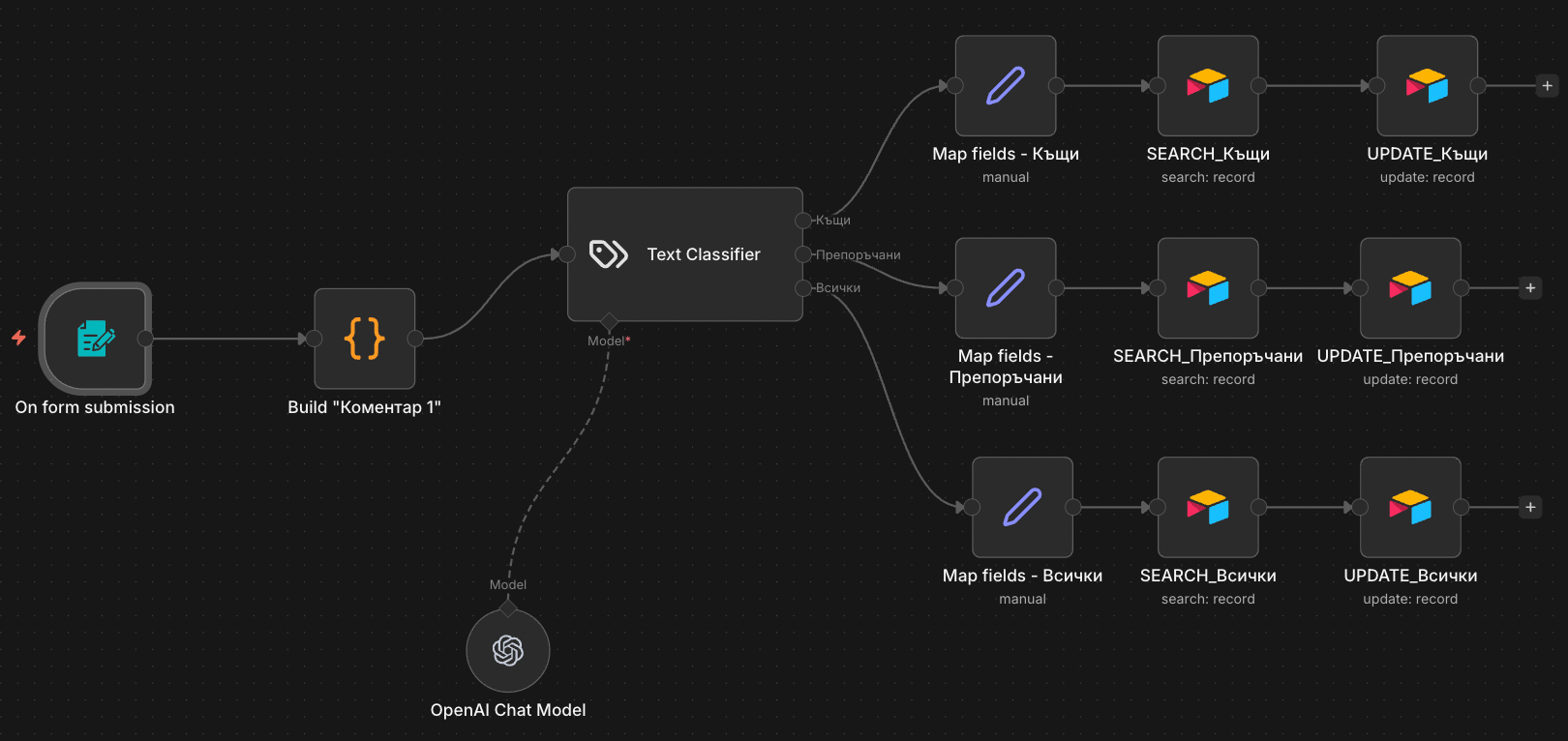
Even with a well-organized database, if every agent writes notes in their own way, the data quickly becomes difficult to read, analyze, and use as a real system.
So we built an automation that standardizes the most important moment in the sales process: the first conversation with a potential client. After it, the agent fills in an internal form, and the system writes a standard "Comment 1" into the database.
Why this automation was necessary
When an agent speaks with a new client, they need to collect important information. In real life, a few things tend to happen:
- The agent is rushed because they have more calls lined up
- They write notes quickly and chaotically
- They miss important details
- They often forget to ask some of the required questions
The end result is predictable: after a week, even the agents themselves can't make sense of what was discussed with that client, and the agency owner has no chance of doing any meaningful analysis.
How it works, explained simply
The agent completes the form immediately after the first conversation with a lead. The form acts as a "notes template" that makes every agent collect the same information in the same way.
The fields include:
- Which agent spoke with the client
- Client ID (to locate the correct record in the database)
- Reason for searching and timeline
- Square footage and requirements
- Area
- Floor
- Budget and financing
- Additional information
- Which table the client is in (apartments, houses, or referrals)
Once the agent hits "Submit," n8n (a tool that connects programs and runs steps by rules) does three things:
- Takes all the data entered in the form
- Generates a clean, formatted text block from a template
- Writes that block into the "Comment 1" column in the Airtable database
The real benefit for the agency
This solution may seem small, but it influences every stage that follows.
Agents follow a consistent standard that doesn't depend on personal style, experience level, or discipline. The data is now "readable." Anyone can open a client's profile and understand what was discussed without having to call a colleague, and the owner gains control and visibility.
Solution 4: Every agent opens a client profile with a plan
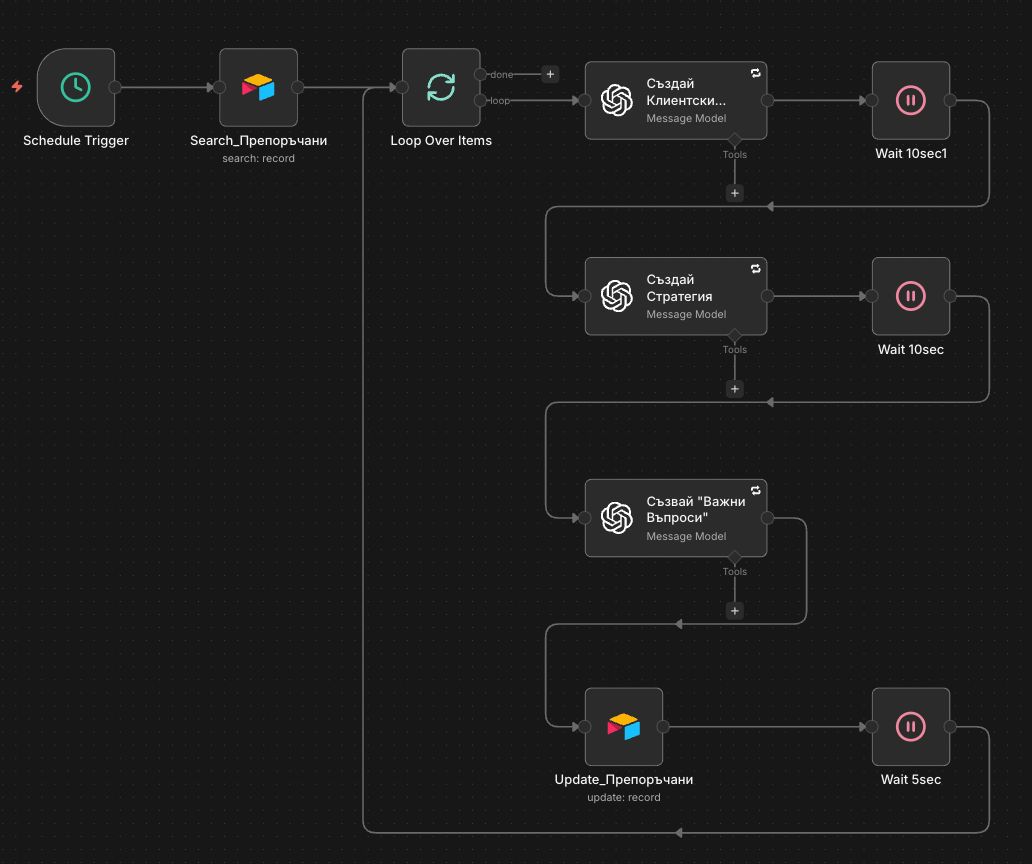
What problem does it solve?
The agency had a large database, but agents were working with incomplete and scattered information. Even when they had notes from previous conversations, those notes were written in different ways and didn't show quickly what mattered most.
That created two concrete problems:
- After the initial contact, there was often no clear picture of who the client was or exactly what they were looking for.
- When following up, the agent had no clear plan for leading the conversation or for which questions would move the client toward a deal.
The result was wasted time, inconsistent communication, and weaker conversion from what were otherwise quality leads.
How automation and AI work together
The automation takes chaotic agent notes and turns them into a ready-to-use "action package." The agent can use it immediately, without having to think about where to start.
Instead of every agent reading through long comments and improvising an approach on the spot, the system uses AI (an AI model, the kind behind ChatGPT) to do three things:
- Build a short, structured client profile: budget, location, criteria, timeline, deal likelihood, and preferred communication style.
- Generate an approach strategy: how to lead the conversation, position offers, identify the client's priorities, and handle typical objections.
- Prepare the exact questions the agent should ask in the next contact to clarify the main unknowns and move the client toward a decision.
All of this is written directly to the client's profile. When the agent opens the record, they see organized information and a clear plan, not a pile of scattered notes.
The effect on the team
The agent opens the profile and immediately sees three things ready to go:
- A clear client profile showing what the client is looking for and how ready they are to make a deal
- A specific strategy for how to lead the conversation and what to offer
- A list of precise questions that open the next step
This standardizes the work of every agent and makes follow-up contact far more effective, regardless of experience level, mood, or memory.
Solution 5: A morning email that says who to call first
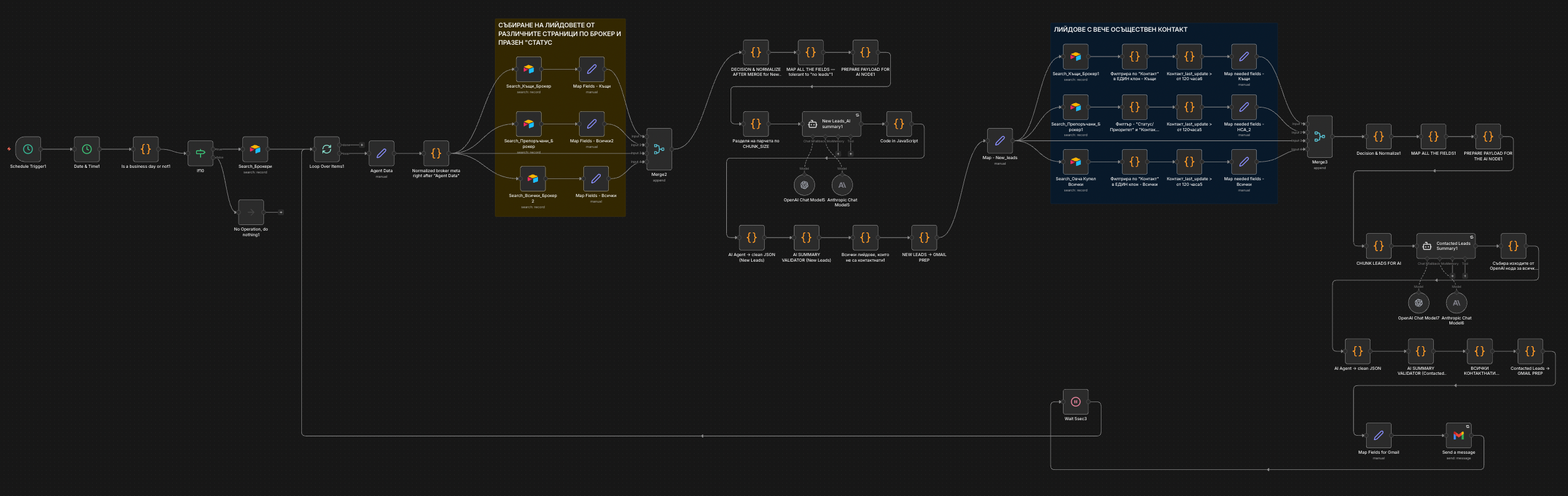
What problem does it solve?
Even with a well-organized database, the same thing happens in an agent's real workday: tasks pile up, potential clients come in from different places, and there's no clear morning focus on who is urgent and who needs a follow-up call.
That leads to three problems:
- New clients aren't handled in time, so they go cold or move on to a competitor.
- Follow-up becomes chaotic, with some clients contacted too late and others forgotten entirely.
- Agents' time is wasted digging through lists and sorting by hand instead of doing what matters most: making calls, scheduling meetings, and conducting viewings.
The automation solves all three by giving each agent a ready daily action plan, with no manual sorting.
How it works, explained simply
At the start of the working day, each agent receives an email telling them exactly which clients to work with that day and what to do with them.
The system automatically surfaces two types of clients:
- New clients, where speed matters most ("call immediately")
- Clients due for a follow-up, who can't be allowed to slip through ("today's follow-up list")
For each follow-up client, the email includes a short AI-generated note of one to two sentences based on available data, such as purchase timeline, contact stage, and last communication channel. The agent gets context and a next step, not just a name and phone number.
What the agent receives
The email is structured as a working brief:
- A prioritized follow-up client list with key data and a short strategy note
- A "New Clients" section for immediate action
- Ready-made questions and a conversation framework to speed up calls and raise the quality of communication
Instead of thinking "where do I even start," the agent begins the day with a ready structure.
The real benefit for the agency
- Faster response to new inquiries means fewer lost clients.
- Consistency in follow-up leads to higher conversion among contacts already collected.
- Less time on admin means more time selling: agents spend their time taking action rather than preparing to act.
- A unified standard across the team means the daily focus becomes systematic, not dependent on memory and habits.
Solution 6: Monthly reports that turn results into goals
What problem does it solve?
Once the database was organized and the daily priorities were running smoothly, one quiet problem remained that was holding back growth: there was no monthly control mechanism for results and team development.
Yes, there was data, but:
- Nobody was turning it into a clear monthly report
- Comparing performance against KPI targets was done "by eye" and often far too late
- Feedback to agents was inconsistent and subjective
- Weak points in the pipeline (Calls → Meetings or Meetings → Deposits) were only identified after the month had already ended
The result was predictable: some agents kept repeating the same mistakes, others were doing things right, but that knowledge never became a standard for the whole team.
Why this automation was necessary
In a sales team, daily tasks alone aren't enough. If you want results to grow systematically, you need a process that every month:
- Measures performance objectively
- Shows where the bottleneck is
- Provides concrete direction
- Sets SMART goals for the next period (specific, measurable goals with a deadline)
- Does all of this without demanding time from the manager
That is data-driven sales management, not just having a CRM.
How it works
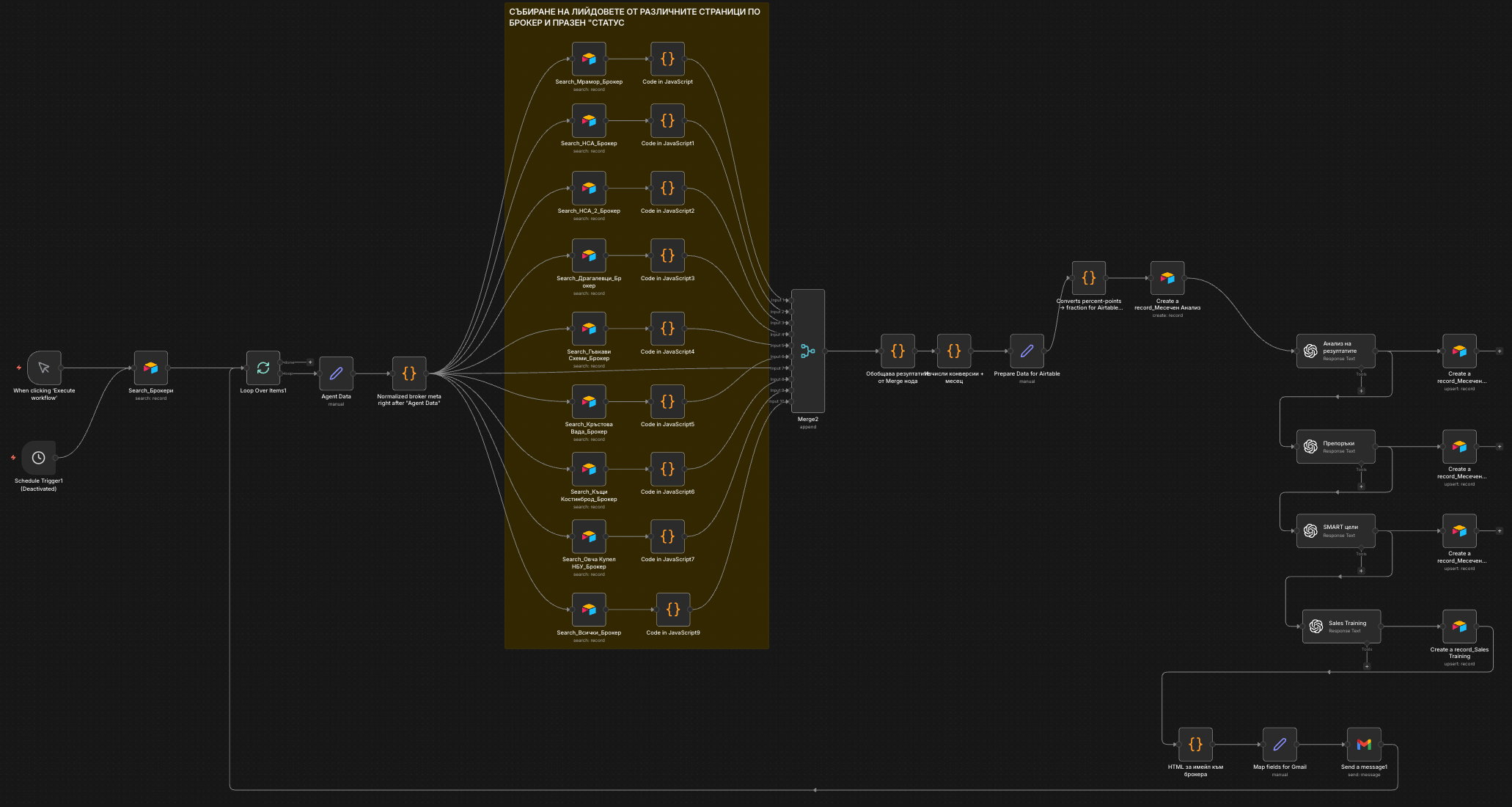
At the end of every month, the system automatically generates a report for each agent and sends it by email.
The automation:
- Collects each agent's KPI results for the month (contacts, meetings, deposits, deals)
- Calculates the Calls → Meetings and Meetings → Deals conversion rates
- Feeds that data to AI, which generates four components: a short analysis (what the numbers show relative to targets), specific recommendations tied to KPIs, SMART goals for the following month, and a micro-training module (only when there's an actual performance gap)
- Saves all new data back into the database
- Sends each agent a personalized email with their monthly performance summary
One detail matters here: the training content isn't generated "just in case." It's only triggered when there's a genuine need.
The real benefit for the agency
This solution closes the "data → action" loop and makes management systematic:
- KPI-based management, not gut feel. Every month it's clear who is above or below target and why.
- One standard for evaluation and feedback. All agents are assessed the same way.
- Faster improvement of weak points. AI identifies exactly where the problem is and what needs to change.
- Time saved. Reports are generated automatically, with no manual spreadsheets or write-ups.
- Performance history and trends. Every monthly result is recorded and can be compared over time.
Instead of results being "checked," they start being managed.
Final results: clients lost to the market, not to chaos
After the solutions were implemented, the effect wasn't just a feeling. It was a measurable change in the process.
Observed results:
- Much faster response to new potential clients (first contact was no longer delayed by days)
- Far fewer missed follow-up calls
- No more duplicate calls to the same client
- Full visibility into what each agent was doing and where each client stood in the process
- Higher discipline in data entry
- Less time spent on internal coordination between agents
- A real increase in conversions from "inquiry" to "viewing" and "meeting"
The agency was no longer losing clients due to organizational chaos. It only lost them when the market or the client's budget made a deal impossible. That's a massive difference.
A ten-step playbook for your own agency
If you run a real estate agency and feel like you're growing faster than your systems can handle, here's a practical framework:
- Centralize your database, don't create a new table for every campaign.
- Define mandatory fields for the first contact.
- Introduce a unified standard for logging conversations.
- Separate "old" from "active" clients.
- Build a mechanism for automatically detecting duplicate records.
- Give agents a daily priority list.
- Visualize KPIs in a dashboard visible to the owner.
- Automate mechanical tasks, not sales.
- Standardize the process so it doesn't depend on any one individual.
- Build architecture for growth, not temporary patches.
These aren't only technical steps. This is how you turn chaos into a system and a system into predictable growth.
Check where your agency is losing clients
If you recognize yourself in the problems above, the way in is a 30-minute strategy conversation, where we will:
- Analyze your current structure (CRM, Sheets, workflow)
- Identify where you're losing clients and time
- Determine which activities can be automated
- Calculate which automations would generate the highest ROI (return on investment) for your agency
The goal isn't to sell you "automation." The goal is to show you where you're losing money and how your system can start working for you instead of against you.
If your business is growing but your processes are struggling to keep up, the next step is a process scan.
Questions and answers
Why was the agency losing clients when it had plenty of leads?
The system was not prepared for the growth. Some leads were never called in time, follow-up calls had no mechanism, and records were buried across more than 10 spreadsheet tabs.
Is Google Sheets enough as a CRM for a real estate agency?
Not at this volume. A separate tab for every campaign, no central control and duplicate records made it fail. We moved the data to Airtable and, above all, to one main table per property type.
What does AI do in this project, and what stays plain automation?
AI builds the client profile, the conversation strategy and the key questions, writes a short note in the morning email, and analyses the monthly results. Duplicate detection and the standard comment built from the form run by fixed rules.
What should an agency fix first?
The playbook starts with two steps: centralize the database instead of opening a new table for every campaign, and define mandatory fields for the first contact.