
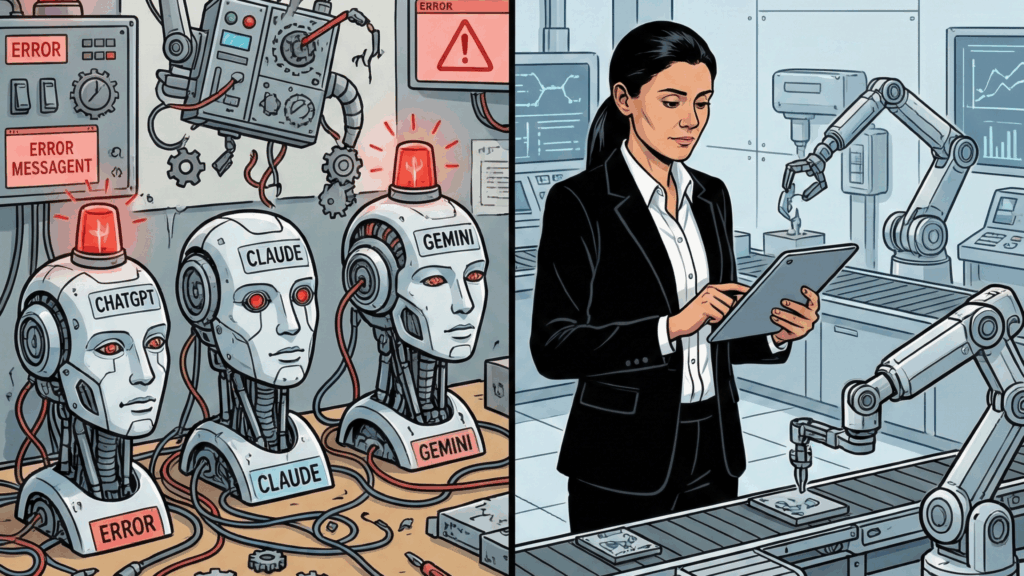
I spent 30 minutes building an automation that three of the world’s most advanced AI models couldn’t get right.
Let me be clear upfront: I didn’t build it in 30 minutes because I’m some kind of genius.
I built it that fast because behind those 30 minutes stand 2 years of practice, hundreds of failed attempts, and countless lessons learned the hard way.
But here’s what really made me write this article.
Every day, I see videos and posts claiming that AI can now build automations “with almost no human involvement.” That you just need to describe what you want, and the LLM will handle the rest.
And honestly? That narrative is dangerous.
Not because AI isn’t powerful. It is.
But because it creates false expectations that lead to wasted time, wasted money, and broken systems.
So today, I’m doing something different.
I’m going to show you the exact same automation task I gave to myself and to three different AI models: ChatGPT, Claude, and Gemini.
You’ll see what they produced.
You’ll see what I produced.
And most importantly, you’ll understand why the difference matters and what it means for anyone thinking about using AI to automate their business.
The Challenge: A Real Client Request
Here’s the task I received from a client:
“From the Google Sheet, inside the column Psychoprofile under sub-item 5) ‘Matching axes’, take the points from ‘Need for structure’ and ‘Emotional support’ for students and mentors and put them in separate columns (‘Need for structure’ and ‘Emotional support’), because we will match with them, but they should also remain in the psychoprofile.”
For non-technical people, let me translate:
The client had a spreadsheet with a column containing detailed psychological profiles of people. Buried inside these profiles was a section called “Matching axes” that included two specific scores on a 1-5 scale for sub-bullets: Need for structure and Emotional support.
These scores were hidden within paragraphs of text, and the client needed them pulled out and placed in their own columns so they could use them later in the process, with another automation, to match students with mentors.
The catch? The original information had to stay exactly as it was. No changes. No deletions.
When I first looked at the spreadsheet, I understood the task immediately. I could already see the entire automation architecture in my head.
But before building it, I wanted to test something.
I wanted to see how the three most popular AI assistants would handle the exact same problem.
The Experiment: ChatGPT vs Claude vs Gemini
I didn’t just ask each AI, “How would you do this?”
That would be too easy to dismiss.
Instead, I wrote a detailed, carefully structured prompt that described:
- The exact context
- The data structure
- The business requirement
- The technical constraints
- The expected output format
I used the same prompt for all three: ChatGPT, Claude, and Gemini.
If AI could really replace a human automation architect, this should be easy, right?
This is the prompt if someone wants to test it:
You are a Senior Automation Development Engineer with deep hands-on experience in n8n.
You work on production-ready automations that can be directly imported and used in n8n without additional adjustments.
## Context
I have an Excel file with multiple columns. Among them are:
– column “Psychoprofile”
– two adjacent columns: “Need for structure” and “Emotional support”
In the column “Psychoprofile” there is a sub-item:
5) “Matching axes”, which contains (among other data) values for:
– “Need for structure: [ number from 1 to 5] – [ Description] ”
– “Emotional support: [ number from 1 to 5] – [ Description]”
## Business requirement
From sub-item 5) “Matching axes” in “Psychoprofile” it is necessary to:
– subtract [ number from 1 to 5], which is found both in “Need for structure” and “Emotional support”. Then these numbers from 1 to 5 should be added in the corresponding columns: “Need for structure” and “Emotional support”.
– the original information should remain unchanged in the column “Psychoprofile”!!!
## Your task
1. Describe the logical structure of the automation in n8n (nodes, sequence, transformations).
2. Generate valid, importable and production-ready JSON for the n8n workflow:
– The JSON must strictly follow the format used by n8n
– not contain placeholders or sample values
– be ready for direct import into n8n
## Limitations
– Do not change or delete existing information in the “Psychoprofile”
– Add values only in the columns: “Need for structure” and “Emotional support”.
– Do not add additional business rules beyond those described
– If the structure of the “Matching axes” is not completely clear, make reasonable assumptions and describe them explicitly before the solution
## Output format
1. Brief description of the automation
2. JSON of the n8n workflow in a separate code block)
What the LLMs Got Right
To their credit, all three AI models correctly identified one critical factor: they recognized that the task required REGEX (a pattern-matching technique used to extract specific text from larger blocks).
This is actually significant.
A beginner building automations would probably try to use an AI assistant to extract the numbers, which would be the worst possible choice for the client.
Why? I’ll explain that in detail later.
What the LLMs Got Wrong
Everything else.
Let me be blunt: none of the three solutions would work in production.
Here’s what each AI produced (I’ll spare you the technical details for now):
Gemini’s Solution:
- Created mock data instead of connecting to the actual Google Sheet
- Would only work as a one-time test, not a real automation

Claude’s Solution:
- Read and wrote files locally instead of updating the Google Sheet
- Would create a new file each time instead of updating the existing spreadsheet
- No error handling for when data is missing

ChatGPT’s Solution:
- Used a webhook trigger (which makes no sense for this use case)
- Overly complicated extraction logic
- No consideration for rate limits or API constraints

All three solutions looked impressive on the surface.
All three would fail in the real world.
The Human Solution: What I Actually Built
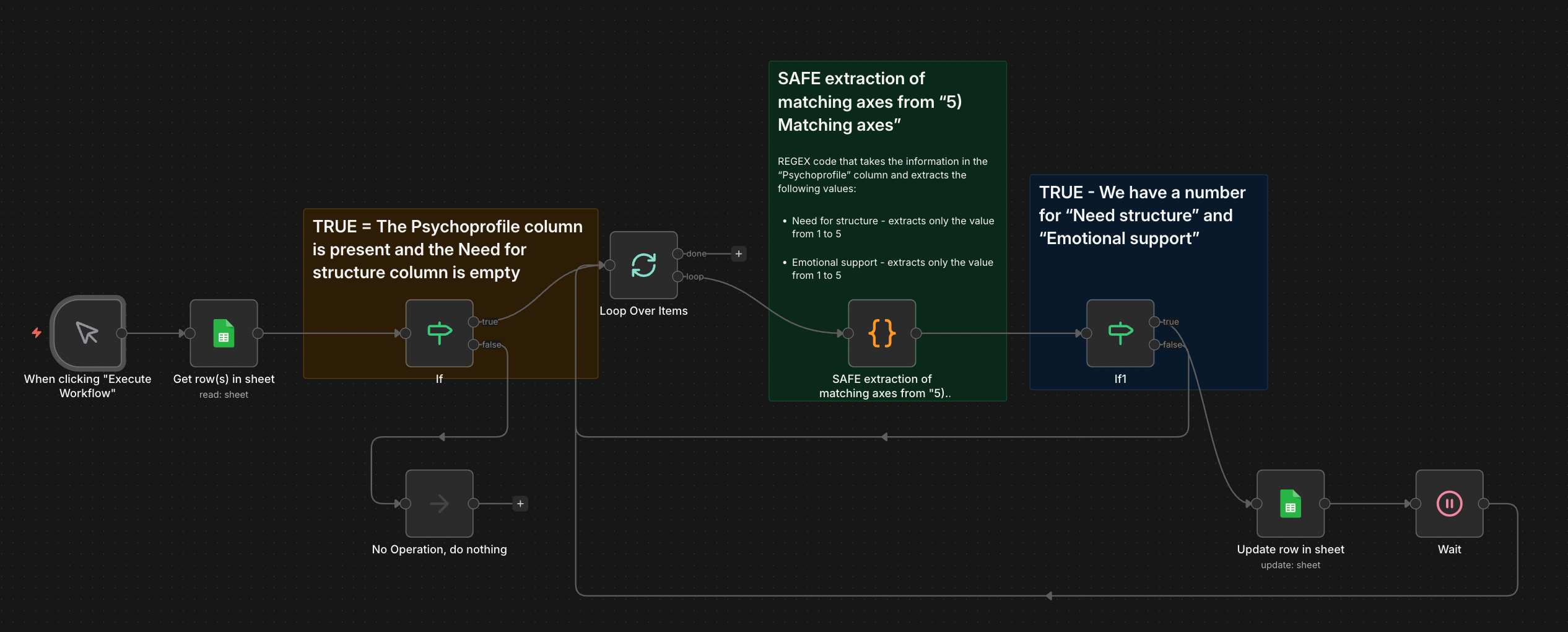
Now let me show you what I built in those 30 minutes.
For the non-technical readers, I’ll explain each step in plain language.
Step 1: Connect to the Real Data Source
First, I connected directly to the client’s Google Sheet.
Not mock data. Not a local file. The actual spreadsheet they work with every day.
This seems obvious, but look back at the AI solutions: only one of them even attempted this, and it got the approach wrong.
Step 2: Filter the Rows That Need Processing
I added a filter that only processes rows where:
- The Psychoprofile column contains data, AND
- The “Need for structure” column is empty
Think of this as a quality gate. It prevents the automation from:
- Processing the same row twice
- Trying to extract from empty cells
- Overwriting data that’s already been processed
This is a business rule, not a technical requirement.
The AI models didn’t include anything like this because they don’t understand the real-world workflow.
Step 3: Process One Row at a Time
I used something called a “Loop” to process each row individually.
Why one at a time instead of in batches?
Because this automation is updating an external system (Google Sheets), and there’s a risk of:
- Duplicate updates
- Skipped rows
- Unstable behavior if we try to do too many at once
When you’re building for production, stability beats speed every single time.
None of the AI solutions considered this.
Step 4: Extract the Numbers Using REGEX
This is where the actual extraction happens.
ChatGPT helped me to write a custom code that looks at the text in the Psychoprofile column and uses REGEX patterns to find:
- “Need for structure: [number from 1 to 5]”
- “Emotional support: [number from 1 to 5]”
The code extracts ONLY the numbers and ignores everything else.
Here’s the critical difference from an AI solution:
My REGEX code is deterministic.
It follows strict rules.
It either finds the pattern or it doesn’t.
There’s no “interpretation.”
No “guessing.”
No “probably.”
If it breaks, it breaks in a predictable way, and I can fix it by adding a new rule.
Step 5: Verify the Results
Before writing anything back to the spreadsheet, I added another filter:
Does this row actually have numbers for both “Need for structure” AND “Emotional support”?
If yes → proceed to the next step.
If no → skip this row and move to the next one.
This prevents the automation from writing incomplete or incorrect data.
Again, this is about production reliability, not just “getting it to work once.”
Step 6: Write the Data Back to Google Sheets
Only now do we write the extracted numbers back to the spreadsheet in the correct columns.
Step 7: Wait Before Processing the Next Row
I added a 10-second wait between each row.
Why?
To avoid overwhelming Google Sheets’ API with too many requests too quickly, which could cause the automation to fail or get temporarily blocked.
This is the kind of detail you only learn from experience. The AI models didn’t include anything like this.
Step 8: Close the Loop and Repeat
The automation continues processing row by row until all rows have been handled.
Why I Chose REGEX Over an LLM Assistant
Now, let me address the elephant in the room.
All three AI models correctly identified that REGEX was needed. But here’s an alternative approach I could have used:
Instead of using REGEX, I could have sent each Psychoprofile text to an AI model (such as Claude or GPT) and asked it to extract the numbers.
In fact, many automation beginners would do exactly this.
So why didn’t I?
Reason 1: Cost
Every time you send text to an AI model, you pay for:
- Input tokens (the text you send)
- Output tokens (the response you get back)
With hundreds or thousands of rows, this adds up fast.
REGEX?
Completely free.
It runs locally.
No API calls.
No usage charges.
Reason 2: Reliability
Even with a perfect prompt and low temperature settings, an AI model can:
- Hallucinate numbers that don’t exist
- Interpret the text differently than you intended
- Miss numbers that are formatted slightly differently
REGEX is 100% deterministic. It either matches the pattern or it doesn’t. There’s no ambiguity.
Reason 3: Speed
REGEX runs instantly. No network delay. No waiting for an API response.
An AI model requires:
- Sending the request over the internet
- Waiting for the model to process it
- Receiving the response back
Multiply that by hundreds of rows, and you’re adding significant delay.
Reason 4: Predictability and Improvement Over Time
Here’s the most important reason:
REGEX improves with every edge case you encounter.
If the automation encounters a new format it doesn’t recognize, I can:
- Add a new pattern to the REGEX
- Test it
- Deploy it
- Now it handles that case forever
With an AI model, each new edge case requires:
- Updating the prompt (but note that you can not put more and more text in the prompt because at some point it will start returning only errors)
- Testing to make sure it doesn’t break other cases
- Hoping the model interprets it correctly every time
The REGEX solution gets more reliable over time. The AI solution introduces more variables.
When Would an AI Assistant Be the Right Choice?
I’m not saying AI is never the right tool. There are absolutely cases where using an LLM makes sense:
- When the text is highly unstructured
- When the patterns are too complex for REGEX
- When you need semantic understanding, not just pattern matching
- When cost and speed aren’t critical factors
But for this task? REGEX was the correct choice.
The goal isn’t “intelligent interpretation.”
The goal is absolute accuracy and repeatability.
The Real Differences: Why the Human Solution Works and the AI Solutions Don’t
Let me break down the fundamental differences in a way that matters for business owners, not just developers.
1. The AI Solutions Don’t Account for Real-World Chaos
All three AI models assumed:
- The data is clean
- The format is consistent
- Nothing will go wrong
In reality:
- Some rows might have typos
- Some might use different punctuation (dash vs period)
- Some might be missing data entirely
My solution handles all of these cases explicitly.
2. The AI Solutions Have No Error Recovery
What happens when the REGEX doesn’t find a match?
In the AI solutions: The automation would either crash or write incorrect data.
In my solution: The row is skipped, logged, and flagged for manual review.
3. The AI Solutions Don’t Respect API Limits
Google Sheets has rate limits. If you send too many requests too fast, it will block you.
None of the AI solutions included any rate limiting or waiting.
Mine does.
4. The AI Solutions Are “Fire and Forget”
The AI models built automations that would run once and then… what?
- How do you know if it worked?
- How do you know if something failed?
- How do you monitor it over time?
None of them addressed this.
My solution includes:
- Clear logging at each step
- Error states that can be monitored
- A process that can be safely re-run if needed
5. The AI Solutions Don’t Understand “Good Enough” vs “Production-Ready”
This is the biggest difference.
The AI solutions would work as a “brainstorming session” if any.
They wouldn`t work even in a controlled demo.
And they definitely wouldn’t work as a production system that runs, handles edge cases, and doesn’t require constant babysitting.
What This Experiment Actually Proves
This isn’t an article about “AI is bad” or “humans are better.”
It’s an article about the gap between a working demo and a production system.
AI is incredibly good at:
- Understanding requirements
- Suggesting approaches
- Generating starting points
- Explaining concepts
But AI right now is not good at:
- Understanding operational constraints
- Anticipating failure modes
- Building for long-term maintainability
- Making trade-offs based on business context
The Uncomfortable Truth About “AI-Built Automations”
Here’s what I really want you to understand:
The output is not the product.
The system is the product.
When you hire someone (or use AI) to build an automation, you’re not just buying:
- A workflow that runs once
- A script that works with perfect data
- A demo that impresses in a meeting
You’re buying:
- A system that handles errors gracefully
- A process that can be monitored and improved
- An architecture that won’t break when your business changes
And that’s where AI falls short.
Not because the technology isn’t impressive. It is.
But because building production systems requires judgment, experience, and context that AI doesn’t have.
When AI Is Your Co-Pilot, Not Your Pilot
Let me be clear: I use AI every single day in my work.
I use it to:
- Generate boilerplate code faster
- Explore different approaches to a problem
- Document my work more efficiently
- Debug issues I’m stuck on
But I never trust AI to make the final call on:
- Architecture decisions
- Error handling strategies
- Production deployment approaches
- Trade-offs between speed, cost, and reliability
AI accelerates my work.
But it doesn’t replace my judgment.
Think of it this way:
AI is like having a junior developer who’s incredibly fast, knows a lot of syntax, but has never actually shipped anything to production.
They can help. They can save you time. They can generate ideas.
But you still need someone with experience to review their work, catch edge cases, and ensure it’s production-ready.
What You Should Take Away From This
If you’re a business owner considering automation, here’s what matters:
1. Don’t Trust “AI-Built Automations” Without Human Oversight
If someone tells you they can build your automation “100% with AI,” run.
Not because AI can’t help. It can.
But because production systems require:
- Business context AI doesn’t have
- Operational experience AI doesn’t possess
- Trade-off decisions that require judgment
2. The Cheapest Solution Upfront Is Usually the Most Expensive Long-Term
A half-working automation that requires constant fixes costs more than a properly built system that runs reliably from day one.
I’ve seen companies pay for the same automation three times because they kept choosing the cheapest option that “looked good enough.”
3. Ask Your Automation Partner These Questions
Before you hire anyone (or use AI) to build an automation, ask:
- “How will this handle errors?”
- “What happens when the data format changes?”
- “How will we monitor if this is working?”
- “Can this be safely re-run if something goes wrong?”
- “What’s your plan for maintaining this over time?”
If they can’t answer these questions clearly, they’re not building for production. They’re building a demo.
4. Understand the Difference Between “Working” and “Production-Ready”
“Working” means it runs successfully once or a few times with good data.
“Production-ready” means:
- It handles bad data gracefully
- It includes error recovery
- It can be monitored
- It respects API limits
- It’s maintainable by someone other than the original builder
That’s the difference between a $500 automation and a $5,000 automation.
And paradoxically, the $5,000 automation is usually cheaper in the long run.
My Prediction for the Next 12 Months
AI will get better at building automations. Much better.
But it won’t replace human expertise. It will augment it.
The automation architects who win will be the ones who:
- Use AI to work faster
- But apply human judgment to work better
- Combine the speed of AI with the reliability of experience
The automation projects that fail will be the ones built entirely by AI without proper oversight, maintenance, or production readiness.
Speed without quality is just expensive chaos.
The Question You Should Really Be Asking
It’s not “Can AI build my automation?”
It’s “Can the person building my automation use AI effectively while ensuring what they deliver actually works in the real world?”
That’s the difference between:
- A tool that helps you
- A system that transforms your business
Want to See How Real Automation Is Built?
If you’re considering automation for your business and want to work with someone who:
- Understands the difference between demos and production systems
- Uses AI as a tool, not a replacement for experience
- Builds systems that are monitored, maintained, and actually reliable
Then let’s talk.
I’ll review your process, identify what’s worth automating, and give you an honest assessment of whether automation makes sense right now.
No AI-generated promises. No “set it and forget it” fairy tales. Just real talk about what works and what doesn’t.
👉 Schedule a free consultation here
One Final Thought
This article isn’t about AI being useless. It’s about AI being misunderstood.
AI is an incredible tool when used correctly.
But it’s a dangerous shortcut when used carelessly.
The companies that win with automation will be the ones who understand:
Technology is the tool. Experience is the craftsman. Both are necessary.
Which one do you have?