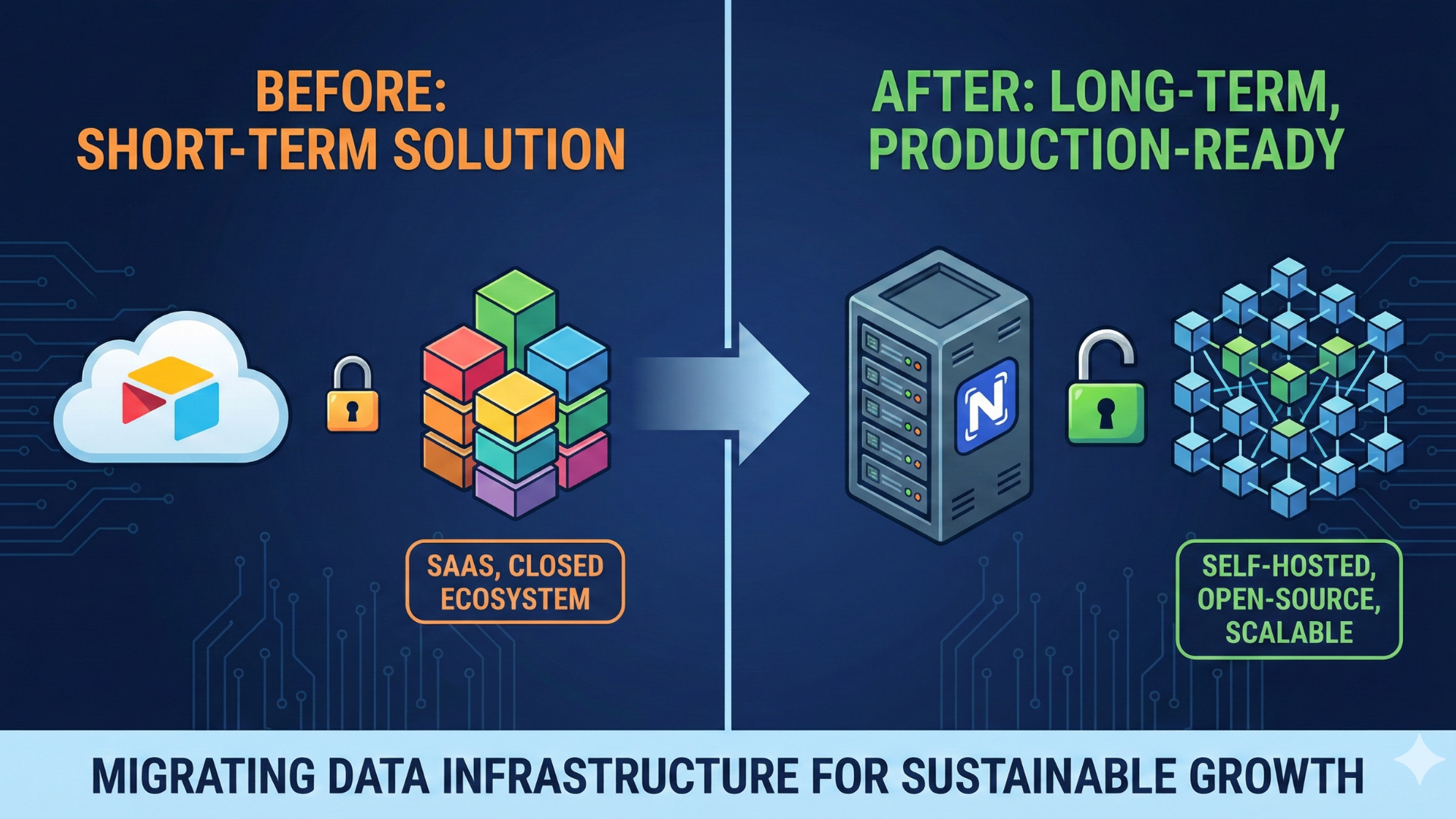

There’s a moment every growing company experiences, the moment when success becomes a threat to its own stability.
For Marinext AI, that moment came after a conversation with a potential client… and after reviewing several of our already-running projects.
As I walked through the automations we had built, the workflows we were maintaining, and the communication patterns between our team and our clients, something became painfully clear:
We were growing faster than our internal systems could keep up.
And if we didn’t change that immediately, the quality of our work, our response time, and ultimately the trust of our clients would be at risk.
The truth is simple:
💡 High-level automation requires high-level operations behind the scenes.
I’ve always believed in transparency.
I don’t want clients to think we are perfect.
I want them to know we are obsessed with improvement. Because automation is not just about building workflows, it is a responsibility. It is a reliability. It is an operational discipline.
So in this article, I want to pull back the curtain and show you:
- The exact weaknesses I identified inside Marinext AI.
- The operational system we built to eliminate these weaknesses.
- How do these improvements fit into and expand our HARDEN™ Method?
- And what does all of this mean for our clients in real business outcomes?
This is not just “how we work.”
This is the standard we now hold ourselves to.
A Note to Our Readers
In this article, I share the principles, systems, and standards we’re implementing inside Marinext AI.
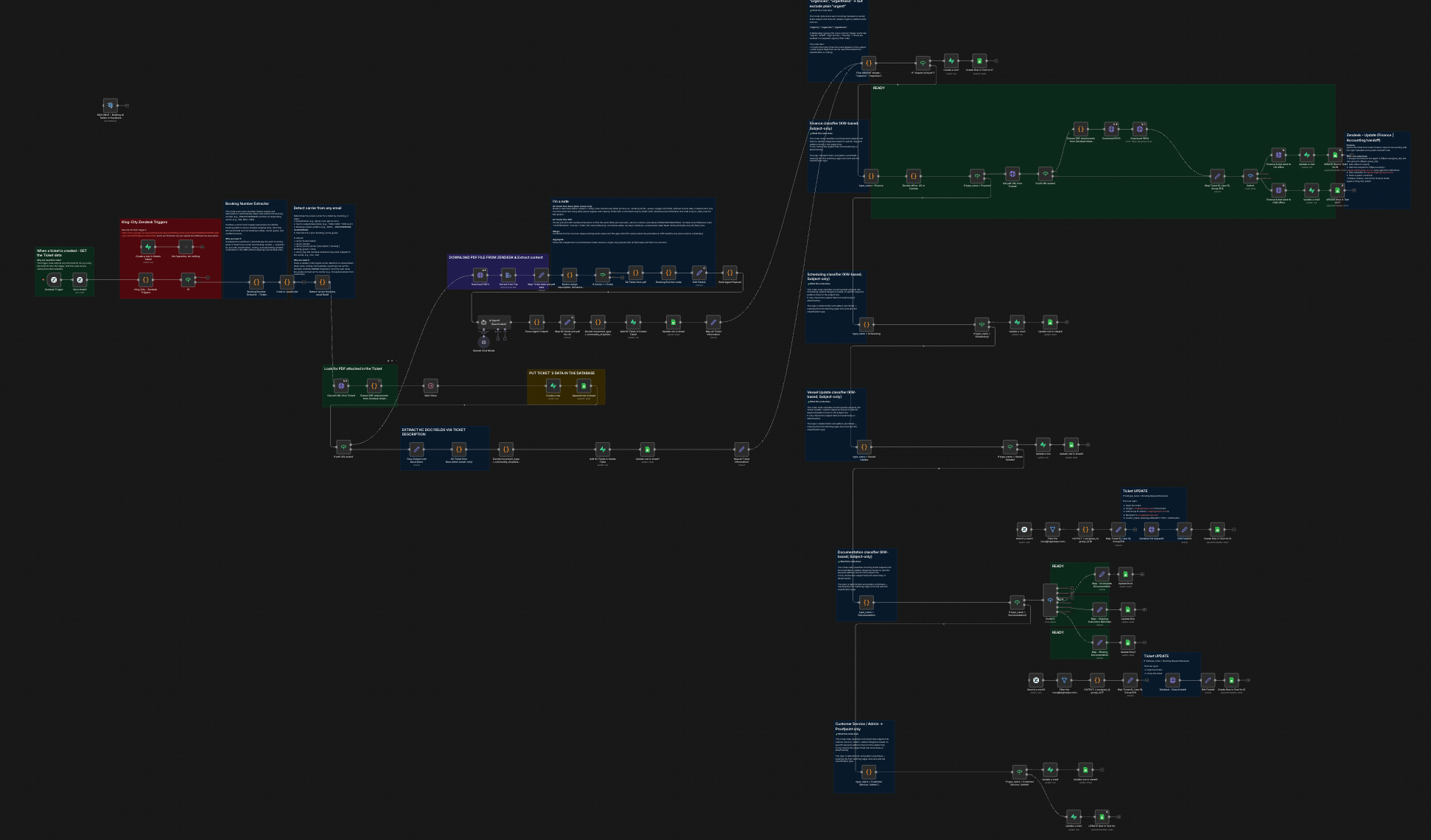
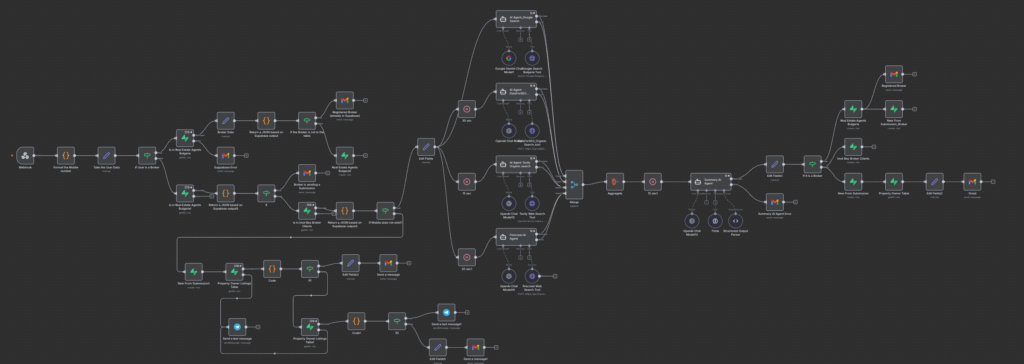
But I also know many of you want to see the practice – the actual automations, their logic, architecture, and the technical decisions behind them.
That’s why I made a strategic decision:
Every automation about the 5 systems we implemented will be presented in a dedicated, detailed article, one by one.
Each article will include:
- the visual architecture of the workflow
- a breakdown of the underlying logic
- key technical decisions
- the integrations and AI models used
- error-handling design
- real examples of input → processing → output
- the business problem it solves and the ROI it delivers
I believe transparency is a strength.
And if we want to demonstrate what high-quality automation truly looks like, we shouldn’t just deliver it; we should show it.
So expect a series of technical, strategic, and visual breakdowns designed to bring clarity to both business owners and technical audiences.
What Triggered the Change (The Honest Story)
Let me start with the truth most agencies avoid saying out loud:
Growth can expose your operational weaknesses faster than anything else.
For us, the warning signs appeared gradually.
A few tasks were missed here and there.
A workflow error that slipped past unnoticed for a little too long (and the worst part was that the client called us/wrote us about the error that we missed).
A client is sending instructions across multiple channels: Viber, email, LinkedIn, WhatsApp, and we are trying to piece them together like detectives.
Individually, these situations were manageable.
But together, they created a pattern:
⚠️ 1. Missed Tasks
Clients asked for changes. Sometimes in Viber. Sometimes in email. Sometimes in a voice note.
We handled 95% perfectly.
But the remaining 5%?
Those were enough to keep me awake at night.
Not because we didn’t care, but because we didn’t have a system that ensured every request entered one central place.
⚠️ 2. Hard-to-Track Errors
Automation is powerful…
…until one small mistake breaks 30 interconnected steps.
We needed a way to track errors across all projects:
- Systematically
- Daily
- Without depending on any single person’s memory
As the number of clients grew, this became non-negotiable.
⚠️ 3. Lack of Up-to-Date Documentation
This one hurt.
We build advanced workflows, often involving:
- Branching logic
- Conditional dependencies
- Multi-system integration
- API limitations
- and dynamic business rules
But like many fast-moving agencies, we sometimes documented after implementation instead of during.
It wasn’t sustainable.
Automation without documentation is like a house without architectural plans; it may stand, but no one knows which wall is holding the structure.
⚠️ 4. Manual Monitoring
Our team was manually checking:
- execution logs
- scheduled workflows
- performance irregularities
- queue failures
This works with 5 projects.
It does NOT work with 20.
The realisation
After one particular meeting with a potential client, a meeting where I proudly explained our process, our quality standards, and our digital discipline, I walked away with an unexpected thought:
“If we want to claim high-quality automation, we must also build high-quality internal systems.”
The HARDEN™ Method was already strong.
It gave structure, clarity, and repeatability to the way we deliver projects.
But something was missing.
What I recognised in that moment was simple:
The method needed an operational backbone: monitoring, documentation, communication, and internal discipline that could support the complexity of the automations we build.
Because at the end of the day, the automations we create are not “just workflows.”
They are software.
Software that optimises business operations.
Software that saves hundreds of hours.
Software that clients depend on every single day.
And if what we build behaves like software, we must adopt the best practices of software development companies.
That means:
- rigorous error handling
- clear documentation
- formal change management
- dependency mapping
- structured testing
- predictable communication
- and ongoing monitoring
Not because it sounds impressive…
… but because, without these foundations, even the best automation will eventually fail under scale, change, or pressure.
So I sat down, listed every pain point we had seen: missed tasks, unclear requests, silent automation failures (my “favorite” when the trigger just decides to stop working), undocumented changes, manual testing, and made a decision:
Marinext AI will operate with the same standards as a high-end software development company, even though we are an automation agency.
This article is the blueprint of that transformation.
The systems, the discipline, and the operational excellence we are implementing to ensure that every client receives not just an automation…but a reliable, scalable, and professionally managed software solution.
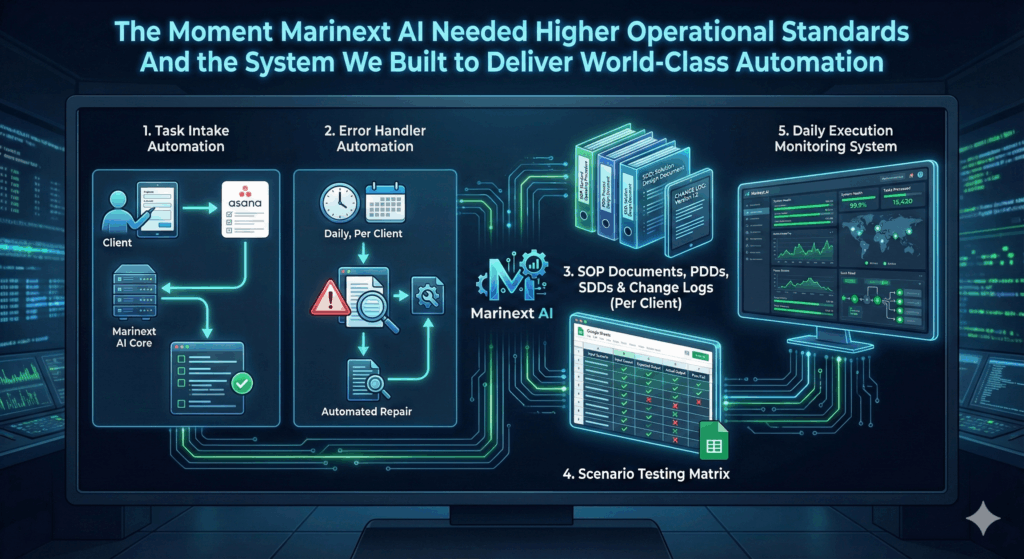
The 5 Critical Systems We Implemented (Overview)
Before we go into each system deeply in later sections, here’s the high-level overview:
- Task Intake Automation (Client → Form → Marinext AI → Asana)
A form-based intake system that turns every client request into a structured, trackable Asana task.
- Error Handler Automation (Daily, Per Client)
A unified error-tracking database + automated logging + human review.
- SOP Documents, PDDs, SDDs & Change Logs (Per Client)
Clear, step-by-step documentation of ALL workflows, plus a traceable log of changes.
- Scenario Testing Matrix in Google Sheets
A library of test cases + past issues + how they were resolved.
- Daily Execution Monitoring System
Meta-automation checks that every workflow is running as expected.
These five systems now form a new internal pillar inside the HARDEN™ Method, one focused on operational reliability and long-term project health.
System 1: The Task Intake Automation (Client → Form → Marinext AI → Asana)
The first problem I needed to solve was the chaos of communication.
Clients would message us everywhere: Viber, WhatsApp, LinkedIn, email, voice notes, forwarded screenshots, handwritten notes photographed at 11 PM… I’m not exaggerating.
When you manage only a few clients, this is tolerable.
But when you manage many, chaos becomes a threat to quality.
I realised something very important:
Clients don’t care how we organise ourselves. They care that nothing is ever missed.
So we built a new system, a formal intake pipeline. And here is how it works:
- Every client now receives a Task Submission Form (we use Asana Forms for this part).
- This form asks structured questions:
- Company Name
- Company ID (we use Airtable as a database for our clients, and each one has a unique ID)
- Please describe the issue you are experiencing.
- Which automation does it affect?
- What is the urgency? (drop-down menu)
- Do you have any screenshots of the issue that you can share with us? (option for attaching a file)
- Once submitted, the task automatically appears in Asana, not in someone’s chat app.
- The task gets:
- Owner
- Deadline
- Priority
- Dependencies
- Comments section
- The client receives an email confirmation.
Why does this matter, you may ask?
Well, the answer is straightforward:
- No more lost messages
- No more “Just reminding you…” texts
- No more digging through screenshots
- No more guessing what the client meant
Everything enters one ecosystem – clean, traceable, auditable.
From an operational standpoint, this is huge.
From a client perspective, it’s professionalism.
This system alone elevated our delivery organization by 50%.
System 2: Error Handler Automation (Daily, Per Client)
This one is critical, especially as our workflows have become more complex.
Here’s the truth about automation:
Automations break. Not because they are bad, but because businesses change.
A client adds a new field.
A CRM updates an API.
A Google Sheet formula returns an unexpected value.
A system rate-limits for no reason.
A wrong input triggers an edge case.
Before improving our internal system, errors were:
- found manually
- found by accident
- found when a client asked, “Why didn’t this run?”
This was unacceptable.
So I introduced the Error Handler System.
For each client:
- Every automation logs:
- Execution errors
- Workflow URL
- Workflow Title (in each title, we add the client ID at the end)
- Unexpected conditions
- Date
- Client company name
- All errors are logged in a Client Error Database (Google Sheets for now).
- A team member checks this dashboard daily.
- The moment a repeating or critical error appears (based on our business rules):
- It is assigned in Asana
- The client gets a notification (if needed, via email)
- The fix enters our change log
From now on:
- Errors no longer “hide” inside n8n (yes, this is the software we use most of the time) execution logs
- We catch issues before clients ever see them
- We maintain reliability at scale
- We operate like a software engineering team, not an agency
This system ensures that automation becomes something clients can actually trust, not a black box that sometimes “mysteriously fails.”
System 3: SOP Documents, PDDs, SDDs & Change Logs (Per Client)
This was one of the most transformative upgrades we introduced.
During a review of our active projects, I had an uncomfortable realization:
We were building great automations… but not documenting them properly.
And this is a common trap for fast-growing agencies:
Documentation is usually written after the work is done, when everyone is tired, rushed, or already knee-deep in the next project.
But as the number of workflows grows, documentation stops being “nice to have” and becomes absolutely essential for:
- Onboarding new developers
- Maintaining automations long-term
- Explaining logic clearly to clients
- Troubleshooting in minutes, not hours
- Scaling a project without breaking what already works
So we introduced a new company-wide standard:
Every client now receives a complete documentation set: SOP + PDD + SDD + Change Log
This is our new gold standard.
PDD (Process Design Document)
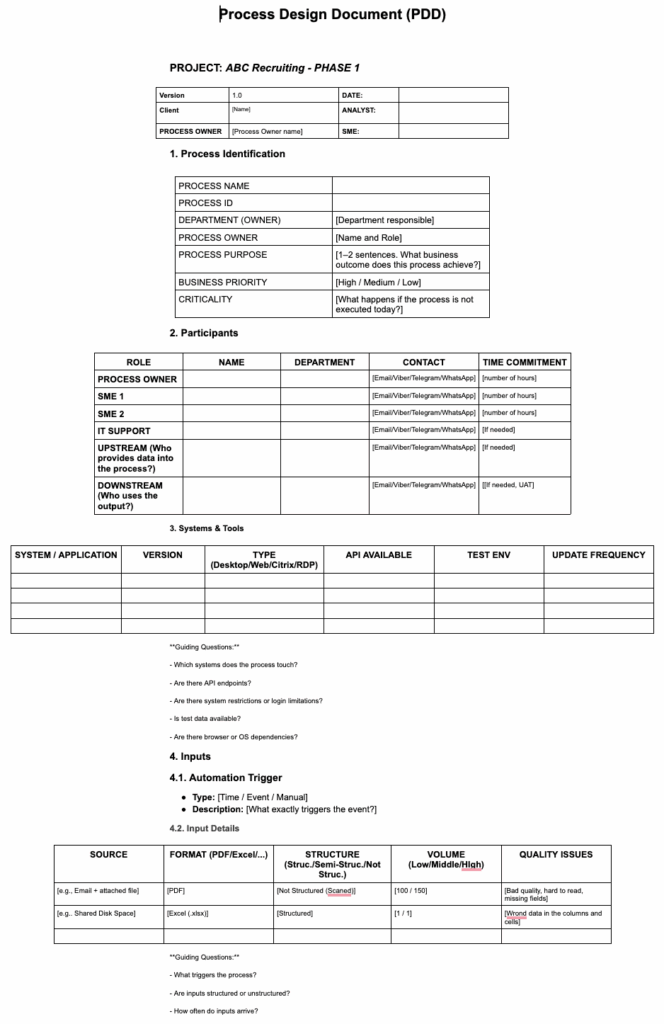
This document describes the business process in detail before automation happens.
It includes:
- Step-by-step business workflow
- Software that will be needed
- Business Rules, exceptions & edge cases & dependencies
- Inputs, outputs, and data structure
This helps the client understand what is being automated and allows our team to match the solution to the business reality.
You can read more here:
PDD (Process Design Document) Guide
2. SDD (Solution Design Document)
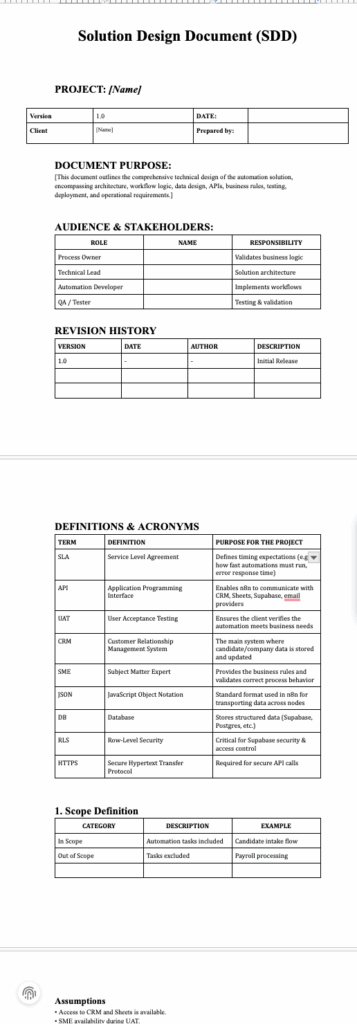
If the PDD explains the business logic, then the SDD explains how the automation will be built technically.
Every SDD includes:
- Workflow architecture
- Triggers, logic, and conditions
- Variables & data mapping
- API interactions
- Error-handling logic
- Integration dependencies
- Expected outputs
- Testing scenarios
Together, the PDD + SDD form the complete blueprint for the developer team, no guesswork, no assumptions.
3. SOP Document (Standard Operating Procedure)
The SOP captures the final state of the automation once it is built and delivered.
It includes:
- Descriptions of every automation
- Triggers
- Logic flow
- Variable definitions
- Business rules
- Architecture diagrams
- Version history
- Step-by-Step guide on each node (why we need it, what it does, etc.)
4. Change Log (Timestamped, With Author Info)
Every modification is logged.
If the client changes something in their system (e.g., adds a new table), we instantly know:
- What was affected
- Which automations depend on it
- Which developer made the last update
- What needs to be changed next
Example checklist:
“If “Real Estate Agency X” adds a new table → update 7 automations:
A, B, C, D, E, F, G.”
This eliminates confusion and prevents accidental breaks in the automation ecosystem.
Now:
- We never lose track of what was built: Everything is documented, timestamped, structured, and easy to reference.
- When the client makes a change, we know exactly what to update: No guessing. No digging. Immediate clarity.
- New team members understand the project instantly: Onboarding becomes faster, and risk is reduced dramatically.
- Clients feel they are working with a company that values structure and long-term stability: This builds trust and positions us as a premium partner.
- It gives Marinext AI a competitive advantage: Most automation agencies do not document their work at this level.
We do, and this is why our automations scale, last, and stay stable.
System 4: Scenario Testing Matrix (Google Sheets)
Every automation works flawlessly…until it meets a real human doing something unexpected.
That’s the moment when even the smartest workflow can fail — not because it’s poorly built, but because real-world behavior is messy, unpredictable, and full of edge cases no one anticipated.
To minimize this risk, we introduced a structured quality assurance system:
The Scenario Testing Matrix
This is a centralized Google Sheet where we map, test, and document every scenario we can predict before an automation goes live. This is the “Break” step in our Harden Method.
And while we know it’s impossible to simulate every real-life situation, our goal is to cover as many as we can, logically, systematically, and repeatedly.
This matrix includes:
- standard scenarios (ideal user flow)
- edge cases
- invalid inputs
- missing data situations
- integrations failing or timing out
- user behavior patterns (“clicked twice”, “submitted incomplete form”, etc.)
- system-to-system inconsistencies
Each scenario is tested, documented, and tracked with:
- What happened?
- What broke (if anything)?
- How was it fixed?
- The result
This is why QA is not optional in our agency; it’s a foundational part of our delivery process.
Because even the best-designed automation is only as strong as the scenarios it survives.
Why does this matter?
- No more guessing what caused an issue
- We build a historical record of edge cases
- When a new automation is added, we re-run all existing scenarios
- QA becomes standardised, not improvised
- Clients get confidence, not uncertainty
This testing system strengthens the “HARDEN” part of our method and ensures automations survive in real business environments, not just in theory.
System 5: Daily Execution Monitoring Automation
This was the final missing piece, the system that watches all other systems.
At some point, we realized something crucial:
If we want stability, we need a meta-automation that monitors the health of every workflow, across every client, every single day.
So we built exactly that.
Each morning, the monitoring automation runs a full audit and checks:
- Did every workflow execute on schedule?
- Did any automation fail silently?
- Were there missed or skipped runs?
- Did any flow take unusually long to process?
- Are there signs of bottlenecks or integration delays?
If something looks off, an automatic task is created in Asana for the responsible developer.
This ensures that nothing slips through the cracks — even when no error is technically “thrown.”
Why does this system matter (even if we already have an Error Handler)?
If you’ve followed the logic so far, you might ask:
“Why do you need this if you already have an error handler?”
Simple:
Some automations stop working without ever triggering an error.
For example:
- Zendesk triggers are known to stop firing every few days. The workflow simply doesn’t start. No error. No warning.
- A client might send input data that doesn’t match the expected rules. The flow gets stuck on a specific node, but no hard error is generated.
- A workflow might silently fail because a connected API is temporarily slow, but not slow enough to throw a timeout.
In these cases:
⚠️ The Error Handler will NOT activate.
But the automation has still failed, and the client still expects results.
This is why the Daily Monitoring Automation is critical.
It catches the invisible failures.
It ensures that a “silent stop” is treated like a fundamental error.
It gives us complete operational visibility, not only when something breaks loudly, but especially when it breaks quietly.
How These New Systems Strengthen the HARDEN™ Method
Once the five internal systems were defined, the next question became clear:
Where do they live inside the HARDEN™ Method?
The HARDEN Method was never designed to be a static checklist.
It evolves as we evolve.
And the more complex our automations become, the more the Method must include not only how we build, but how we operate.
Each of the upgrades we introduced fits naturally into one of the seven HARDEN phases, reinforcing, strengthening, and closing the operational gaps that arise as you scale.
Below is how each new system becomes a permanent part of the Method going forward.
Step 1 – Discover: Map reality, baselines, constraints, ROI levers
Step 1 has always been the foundation of every automation project, but with our improved internal standards, it has now become even stronger.
This step is anchored in the PDD (Process Design Document), which provides structure and clarity for everything that follows.
The goal of “Discover” is not simply to “gather information,” but to map the truth of how the business operates today.
Through the PDD, this phase now ensures:
- A complete, accurate picture of the current workflow (As-Is process)
- Clear baselines that define what must improve and why
- Business rules, exceptions, and operational constraints
- Required data sources and their structure
- Roles, responsibilities, and user interactions
- Critical dependencies and decision points
- ROI levers — where automation will bring measurable impact
The “Discover” phase is where problems become visible, assumptions are challenged, and opportunities are quantified.
It is where business logic is transformed into a clear, structured model that prepares us for technical design.
The PDD is not just documentation. It is the backbone of Step 1.
It ensures that, before a single node (on n8n, we use nodes) is built, we understand the “why,” “what,” and “where” of the automation.
“Discover” is where alignment happens.
“Design” is where solutions begin.
Step 2 – Design: Data models, roles, exceptions, rollback paths
In our updated workflow, Step 2 is now fully anchored around the SDD (Solution Design Document).
If the PDD captures the “business reality,” the SDD transforms that understanding into a technical blueprint, the architecture that guides every decision in the “Build” phase.
With the introduction of the SDD as an official requirement, the “Design” stage now ensures:
- Every trigger, variable, and output is defined upfront
- Technical logic is mapped clearly before development begins
- Future developers can understand the system without guesswork
- Exception paths are explicitly outlined, not discovered during building
- Rollback and recovery steps are pre-planned
- Dependencies between systems, data sources, and workflows are documented
The SDD strengthens Step 2 by turning “Design” into a phase focused not only on how the automation should function, but also on how it will be maintained, updated, and scaled.
“Design” is no longer about drawing workflows.
It is where we ensure the automation will survive real-world use, future changes, and long-term growth.
Step 3 – Build: Software with guardrails, docs, naming conventions, and logs
With the strengthened “Discover” and “Design” phases, “Build” becomes far more predictable and structured.
This is the moment where ideas become systems, but now with strict technical discipline.
In the updated HARDEN Method, the “Build” phase requires:
- Following the SDD exactly (no improvisation, no “we’ll figure it out later.”)
- Clean architecture inside the automation platforms
- Consistent naming conventions across triggers, variables, and nodes
- Inline comments and logic notes within the automation
- Initial logging structures that will later support monitoring
- Version tracking as part of the SOP documentation
“Build” is now treated the same way software engineering teams build production systems: with clarity, predictability, and maintainability.
The result?
An automation that doesn’t just work, but is understandable, traceable, and ready for long-term evolution.
Step 4 – Break (QA): Negative, load, and UAT testing to kill flakiness
This phase is where we actively try to break what we built.
With the introduction of the Scenario Testing Matrix in Google Sheets, this stage has become significantly stronger.
Its purpose is no longer to confirm correctness. It is to expose fragility.
Step 4 now includes:
- Structured scenario testing
- Negative and stress tests
- Real-world user behavior (including unpredictable or illogical actions)
- Edge-case flows that challenge assumptions
- Tracking of discovered issues and fixes in the testing matrix
- Repeatable tests for future versions
We acknowledge that not every real-world scenario can be predicted, but we can test every scenario we can imagine.
“Break” is where quality becomes measurable.
The goal is not to confirm that the automation works.
The goal is to break it before the client ever can.
And if an automation survives Step 4, then it is ready for Step 5.
Step 5 – Harden: Circuit breakers, monitoring, safeguards before going live
This is the phase that received the most significant transformation in our internal system.
“Harden” ensures that the automation will withstand the test of time, scale, and operational realities.
Two major systems now live here:
1. Error Handler Automations (Daily, Per Client)
These automations capture issues before the client notices them, including:
- Failed executions
- Inconsistent data
- Blocked nodes
- Invalid inputs
- Broken API calls
- Structural changes in client systems
Each error is logged, documented, and routed to our internal task pipeline.
2. Daily Execution Monitoring System (Meta-Automation)
Some failures don’t throw an error. They simply stop working.
Triggers silently freeze. Inputs change. A workflow stops mid-execution.
This system checks:
- Did every workflow run today?
- Did any schedule fail without throwing an error?
- Did any step hang or stall?
- Did any execution take abnormally long?
- Is any trigger inactive or disconnected?
If something is wrong, then a task is created instantly.
Together, these two systems form a dual safety net that makes the “HARDEN” phase bulletproof.
This is where reliability is engineered, long before the project goes live.
Step 6 – Launch: Rollout, training, reversibility
With documentation, monitoring, and safeguards already in place, “Launch” becomes controlled and professional rather than rushed.
This phase now includes:
- Final validation against the SDD and PDD
- Client training and knowledge transfer
- Hypercare period with increased monitoring
- Reversibility plan in case adjustments are needed
- Clear communication guidelines for post-launch requests
“Launch” is not a moment. It is a structured transition from development to real-world use.
Step 7 – Monitor: KPIs, Alerts, Tasks, Cost & Accuracy Over Time
This is where our new operational systems complete the cycle.
Two key components now live inside the Monitor phase:
1. Task Intake Automation (Client → Form → Marinext AI → Asana)
This system eliminates chaos in communication.
Instead of scattered messages across email, Viber, or WhatsApp, every client request is now:
- Enters through one structured form
- Is validated for completeness
- Automatically generates a task in Asana
- Becomes part of a traceable workflow
This ensures that nothing is lost, forgotten, or delayed.
2. Logs: QA Logs, Change Logs, Execution Logs
Long-term monitoring requires visibility.
These logs allow us to track:
- Changes to automations
- Their operational performance
- Recurring issues
- Cost impact
- Accuracy drift
- Team actions
- Client modifications
Monitoring is no longer passive.
It is an active, automated, daily layer that keeps every automation healthy.
Automation Is Not a One-Time Build — It’s a Living System
What this journey taught us is simple, but uncomfortable:
Automation doesn’t fail because of technology.
It fails because of weak operations behind it.
As Marinext AI grew, as client complexity increased, and as more systems went live, we reached a point where good intentions and technical skill were no longer enough.
We needed structure.
We needed visibility.
We needed discipline and not just in client projects, but inside our own company.
That is why we built these internal systems.
Not as “extra processes.”
Not as bureaucracy.
But as operational safeguards that protect our clients, our team, and the long-term value of every automation we deliver.
By embedding these systems directly into the HARDEN™ Method, we made one thing clear:
!!!High-quality automation requires high-quality operations!!!
Every workflow we build is software.
Every automation lives inside a changing business environment.
And every system, no matter how well designed, will face edge cases, failures, and evolution over time.
The difference between fragile automation and resilient automation lies not in intelligence but in structure.
With:
- Documented reality (PDD)
- Intentional design (SDD)
- Disciplined building practices
- Aggressive testing
- Proactive hardening
- Controlled launch
- and continuous monitoring
We no longer hope our automations will work long-term.
We engineer them to survive.
This is how Marinext AI operates today.
This is how our standards continue to evolve.
And this is how we protect our clients from silent failures, hidden costs, and operational chaos.
Automation should not create risk.
It should remove it.
And that only happens when the systems behind the systems are built with the same care as the automations themselves.