

Most real estate agencies believe their main problem is a lack of clients for the properties they offer.
Today, I’m going to walk you through our work with an agency where the problem was exactly the opposite.
This agency was generating plenty of potential clients through advertising campaigns. Forms were being filled out dozens of times a day. Their database was growing, and agents had more than enough work to do.
And then came the “but.”
But despite all that campaign success, a portion of those potential clients were being lost permanently.
As you might have guessed, the problem wasn’t a lack of interest or demand. It was that the system wasn’t prepared for the growth.
In this article, I won’t be talking about theories or generic advice. I’ll show you:
- What the situation looked like before we started working together
- Where exactly the gaps were
- What risks was the existing structure hiding
- And why Google Sheets was no longer enough
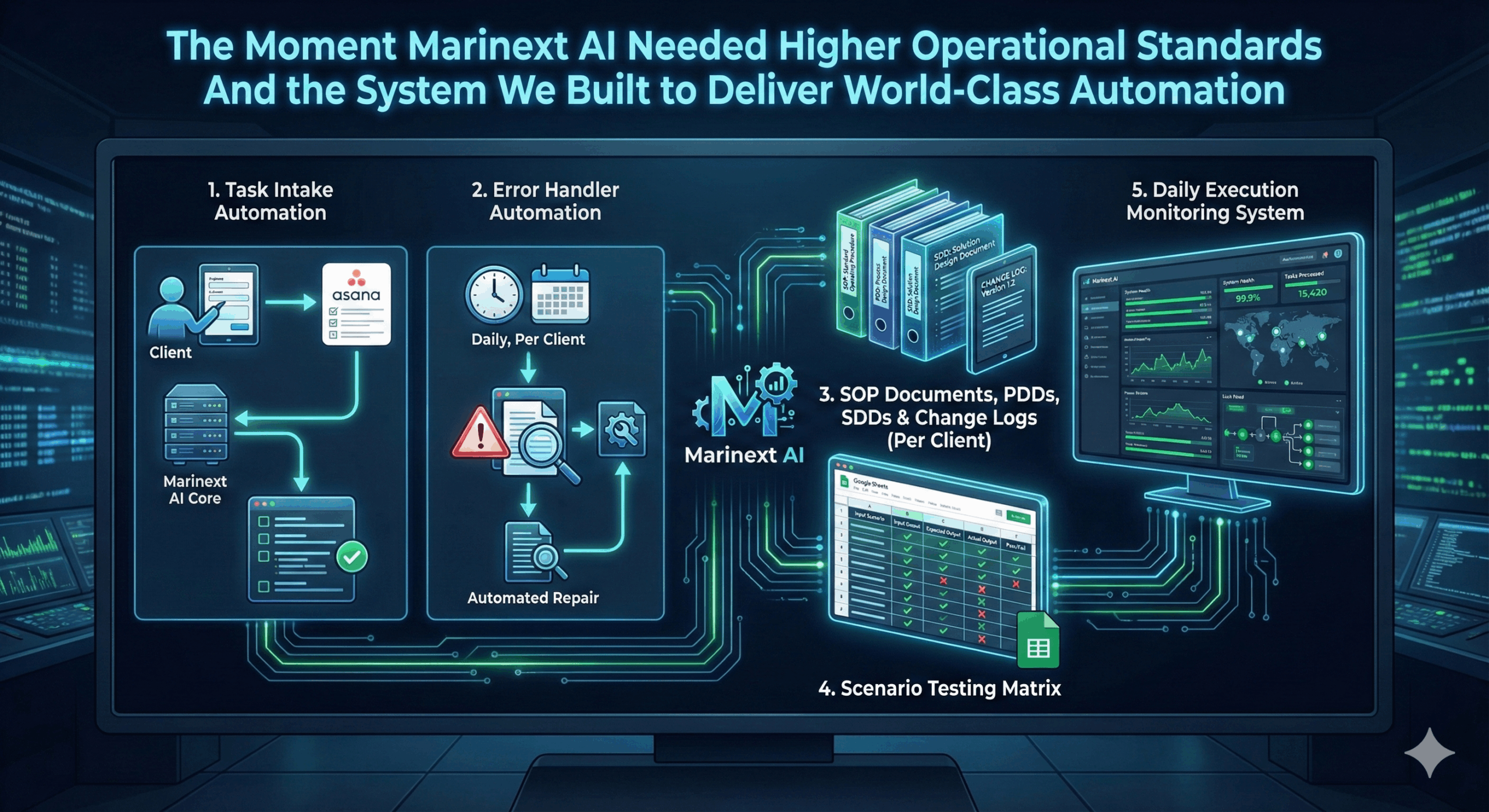
After that, I’ll walk you through the solutions my team and I built, step by step, from restructuring the database and migrating to new software, to automations and a dashboard for visualizing analytics.
I’ll do my best to describe the real problems and limitations we ran into and then the solutions we built to address each one.
The Core Problems of the Real Estate Agency
1. Losing leads as volume grew
As the number of leads in the database increased:
- Some potential clients were never called in time
- There was no clear mechanism for follow-up calls
- When an agent finally reached a client they’d spoken to before, too much time had passed, and the client was already gone
- Some leads were buried in the database and lost permanently
This led to direct financial losses for the agency.
2. No standardized process for working with leads
The agents:
- Relied on memory and personal organization
- Had defined procedures but rarely followed them, often forgetting to collect specific information from clients
- Didn’t follow a unified logic when entering information into the database, and the growing chaos slowed their work down further
There was no order or discipline in day-to-day actions.
3. Chaotic and unstructured database entries
After the audit, it became clear that:
- Different agents filled in information in different ways
- There were no clear rules about what to record or how
- The data was difficult to analyze or use further down the line
- The database wasn’t functioning as a reliable source of truth
This made accountability and analysis almost impossible.
4. Using Google Sheets as the primary database
The state of things before the project:
- Potential clients were collected from various advertising campaigns
- Everything lived in a single file with separate tabs for each campaign
- The number of tabs grew over time, eventually exceeding 10
- There was no centralized control
- Google Sheets was being used as a CRM, which introduced serious structural limitations
5. Duplicate clients and multiple calls to the same person
It doesn’t take long to figure out what happens when you’re running 10 or more ad campaigns, collecting client data, and one person fills out forms from several different campaigns.
That data gets stored in different tabs, which inevitably leads to duplicate records.
And what happened as a result?
Different agents were calling the same client. Poor client experience. An unprofessional impression. A loss of trust.
6. No centralized performance visibility
Before we started the project, the agency owners were dealing with the following:
- Agent performance data was spread across more than 10 spreadsheets
- There were no automated reports; everything had to be done manually
- There was no visualization
- Decisions were made on gut feeling, not data
Because of all of this, the owner asked us to build a dashboard that would analyze and visualize everything they needed. With that dashboard in place, they gained:
- A clear picture of the monthly company performance
- Visibility into each individual agent’s results
- Comparison against monthly KPI targets
- Analysis for any selected time period
7. No automation of repetitive daily tasks
Agents were wasting time:
- Manually tracking new potential clients
- Manually checking for duplicate records
- Manually organizing their workload
This reduced their effectiveness and their capacity for actual client work.
Summary: The State of the Real Estate Agency Before the Project
Before moving on to the solutions, let’s step back and summarize where things stood.
As you’ve already gathered, this real estate agency wasn’t struggling to attract potential clients.
It was struggling with:
- Lack of structure
- Lack of control
- Lack of standards
- Lack of visibility
- Dependence on human memory
- Decentralized data
In other words, the business was growing, but the system wasn’t built to handle that growth.
In the next part, I’ll walk you through the entire process we went through – step by step – and every automation we built to solve each one of these problems.
Solution 1: Structuring the Database and Strategic Migration
Our first step was to restructure the existing database in Google Sheets. We added new columns to introduce clear standards for how information was recorded. Some were designed to be filled in automatically through automations, and others were intended for later analysis and performance measurement.
The goal was simple: make the data consistent, measurable, and usable.
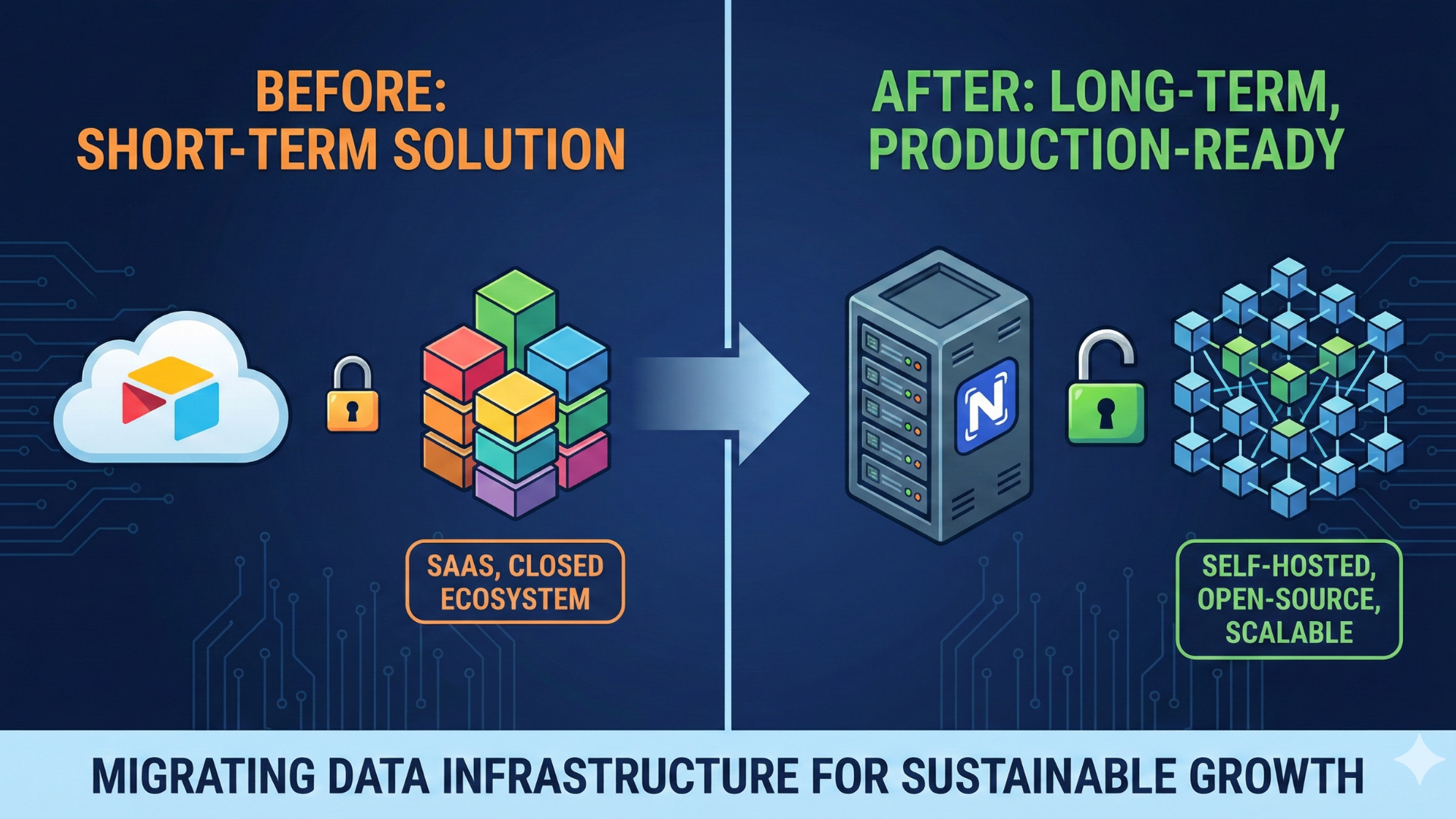
Only after the database was properly structured was the client in a position to take the next logical step – migrating to more serious software.
That’s when we moved the entire database into Airtable.
The problem that surfaced in Airtable
On the surface, everything looked solved. The data was more organized, the interface was friendlier, and the capabilities were greater.
But a new structural risk emerged.
The database continued to grow using the same model it had started with in Google Sheets: a separate table for each advertising campaign.
That meant:
- Every new ad campaign required a new table
- Automations would have to work across a growing number of tables, slowing them down
- Information remained just as scattered as before
- Control was becoming increasingly complex
This model wasn’t sustainable.
So I requested a meeting with the agency owner. I explained that if they continued down this path, in a few months, they’d find themselves in the exact same situation, just in a more modern piece of software.
The problem wasn’t the tool we’d chosen.
The problem was the architecture and the way they worked.
The strategic decision: centralizing the tables
We proposed restructuring the advertising campaigns and the database itself.
Instead of a separate table for each campaign, we created:
- One primary table for apartment advertising campaigns
- One primary table for house advertising campaigns
- One “Referrals” table, added at the client’s explicit request
This way, all potential clients, regardless of which specific ad they came from, began flowing into the same logical structure based on property type.
This brought several key advantages: easier database management, fewer points of risk, simpler automations, better visibility, and easier maintenance going forward.
Most importantly, we stopped the growth of chaos before it could take hold again.
Instead of building more and more automations to patch the problem, we changed the structure so the problem wouldn’t reappear.
This was the first real breakthrough in the project. From that point on, we were building on a stable foundation.
Solution 2: Automation for Detecting Duplicate Clients and Flagging “Old” Records
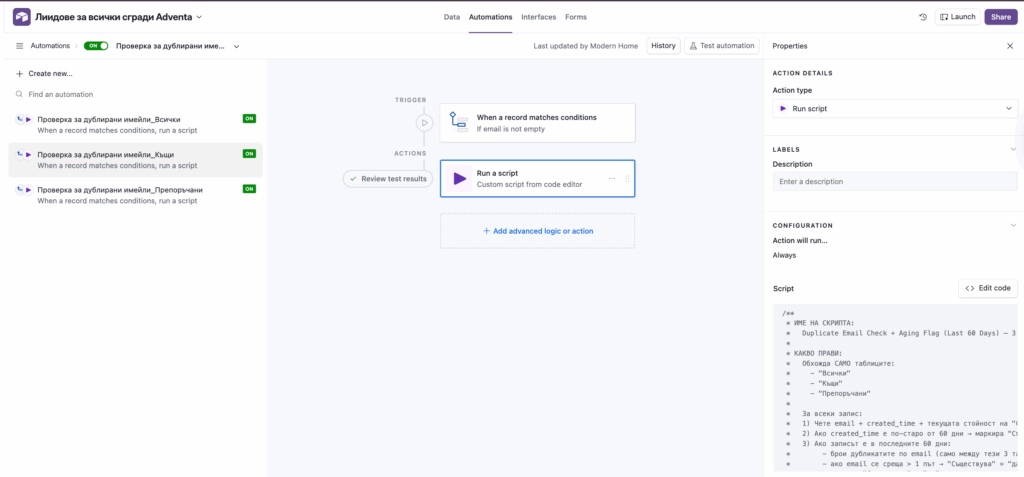
This solution addressed two problems at once.
The first was client duplication across different tables.
The same person could fill out forms from several different ads and end up in more than one table.
The result was unpleasant for both the client and the agency, with different agents calling the same person, which looked unprofessional and destroyed trust before any real work had even begun.
The second problem was the “noise” from old clients.
When a database grows for months, it inevitably fills up with hundreds of records that are no longer relevant. If you let those records participate in the duplicate-detection logic, you start getting false signals.
If a client filled out a form seven months ago and now fills out a new one, that’s a new opportunity for the business, but the system sees it as a “duplicate.” That’s a different situation and needs to be treated differently.
So we built an internal automation script in Airtable that runs exclusively across the three main tables the agency uses daily: “Apartments,” “Houses,” and “Referrals.”
Why does this matter in this particular project?
In this agency, potential clients were coming in from many different ads. That’s normal for a growing business, but it’s dangerous without a control mechanism in place.
This script was the first layer of control.
Once it was in place, we could build on it with confidence, knowing the incoming flow was no longer “contaminated” by duplicates.
Solution 3: Initial Contact Form That Automatically Creates a Standardized “Comment 1” in the Database
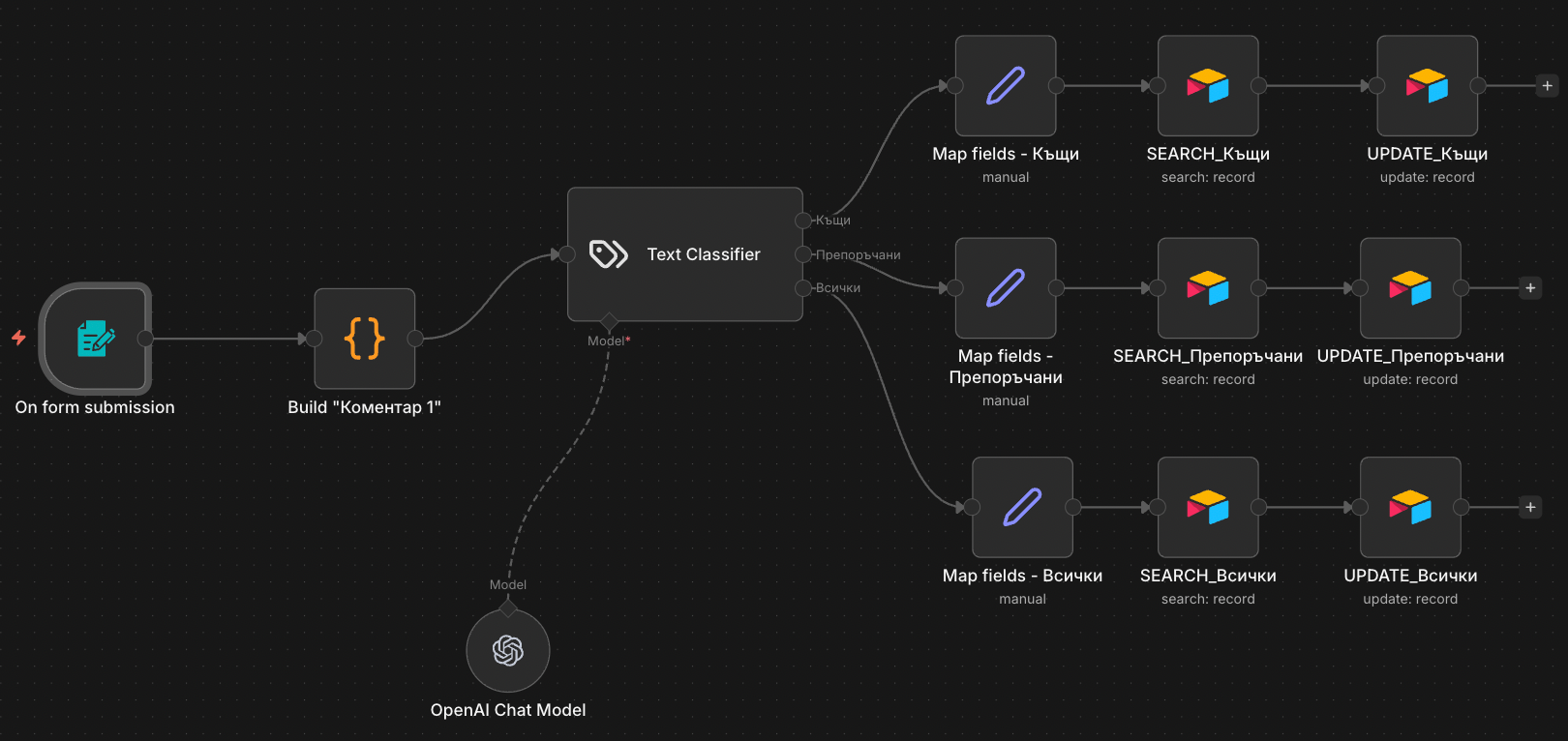
Even with a well-organized database, if every agent writes notes in their own way, the data quickly becomes difficult to read, analyze, and use as a real system.
So we built an automation that standardizes the most important moment in the sales process: the first conversation with a potential client.
Why was this automation necessary?
When an agent speaks with a new client, they need to collect key information. In real life, however, a few things tend to happen:
- The agent is rushed because they have more calls lined up
- They write notes quickly and chaotically
- They miss important details
- They often forget to ask some of the required questions
The end result is predictable: after a week, even the agents themselves can’t make sense of what was discussed with that client, and the agency owner has no chance of doing any meaningful analysis.
This automation solves exactly that.
How the automation works, explained simply
The automation begins with an internal form that the agent completes immediately after the first conversation with a lead.
The form acts as a “notes template” that ensures every agent collects the same information in the same way. (This part is critically important, which is why I’m emphasizing it.)
The fields include things like:
- Which agent spoke with the client
- Client ID (to locate the correct record in the database)
- Reason for searching and timeline
- Square footage and requirements
- Area
- Floor
- Budget and financing
- Допълнителна информация
- Which table the client is in (apartments, houses, or referrals)
What happens after the form is submitted?
Once the agent hits “Submit,” n8n does the following:
- Takes all the data entered in the form
- Generates a clean, formatted text block from a template
- Writes that block into the “Comment 1” column in the Airtable database
This is the most important part: instead of the agent writing free-form text, the system automatically builds the comment in a standardized format.
The real benefit for the agency
This solution may seem small, but its impact is enormous because it influences every stage that follows.
Agents follow a consistent standard that doesn’t depend on personal style, experience level, or discipline. The data is now “readable.”
Anyone can open a client’s profile and understand what was discussed without having to call a colleague. The owner gains control and visibility.
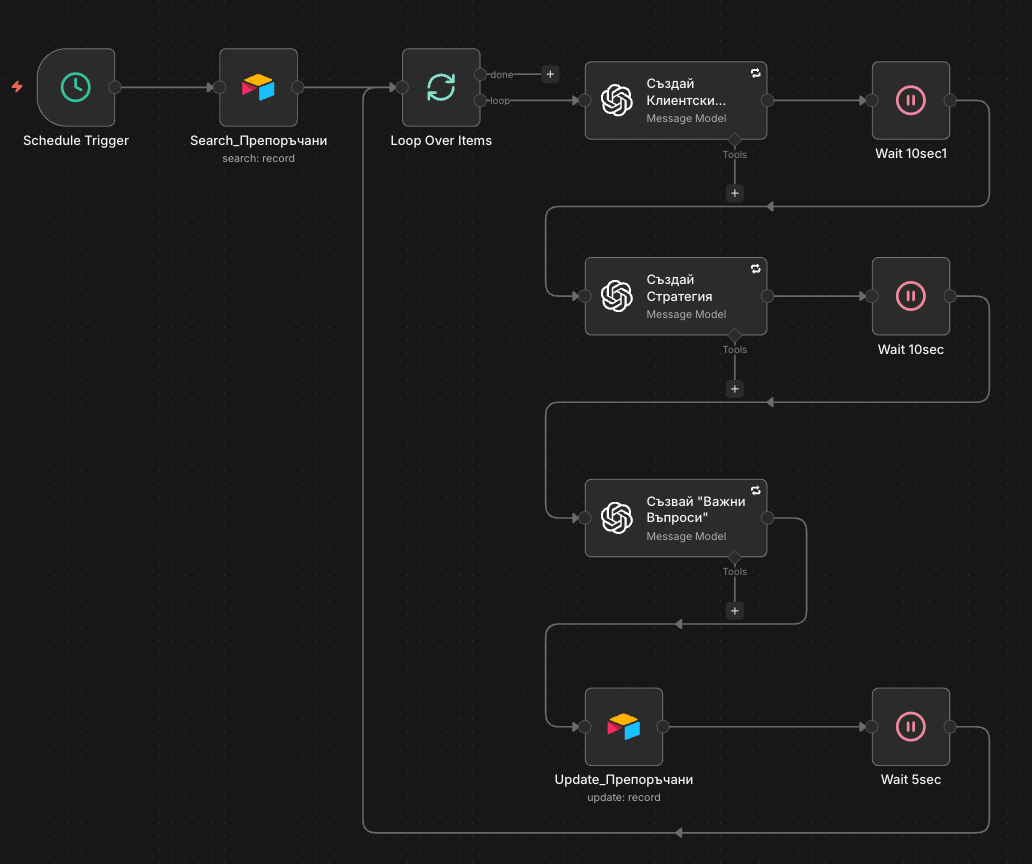
Solution 4: Automation for Creating a Client Profile, Strategy, and “Key Questions”
What problem does it solve for the client?
The agency had a large database, but agents were working with incomplete and scattered information. Even when they had notes from previous conversations, those notes were written in different ways and didn’t provide quick clarity on what mattered most.
This created two concrete problems. First, after the initial contact, there was often no clear picture of who the client was or exactly what they were looking for. Second, when following up, the agent had no clear plan for leading the conversation or for what questions to ask to move the client toward a deal.
The result was wasted time, inconsistent communication, and weaker conversion rates from what were otherwise quality leads.
How do automation and AI work together?
The core idea of this automation is straightforward.
То takes chaotic agent notes and turns them into a ready-to-use “action package” that the agent can use immediately, without having to think about where to start or what’s important.
Instead of every agent reading through long comments, searching for meaning, and improvising an approach on the spot, the system uses AI to automatically do three things:
AI builds a short, structured client profile, a synthesis of what matters most: budget, location, criteria, timeline, deal likelihood, and preferred communication style.
AI generates an approach strategy to lead the conversation, position offers, identify the client’s priorities, and handle typical objections.
AI prepares the exact questions the agent should ask in the next contact to clarify key unknowns and move the client toward a decision.
All of this is written directly to the client’s profile.
When the agent opens the record, they see organized information and a clear plan, not a pile of scattered notes.
In short, we turn notes into a ready-made sales framework, consistent across all agents and immediately applicable.
The effect on the team
The agent opens the client profile and immediately sees three things ready to go:
- a clear client profile showing what the client is looking for and how ready they are to make a deal;
- a specific strategy for how to lead the conversation and what to offer;
- and a list of precise key questions that will unlock the next step.
This standardizes the work of every agent and makes follow-up contact far more effective, regardless of experience level, mood, or memory.
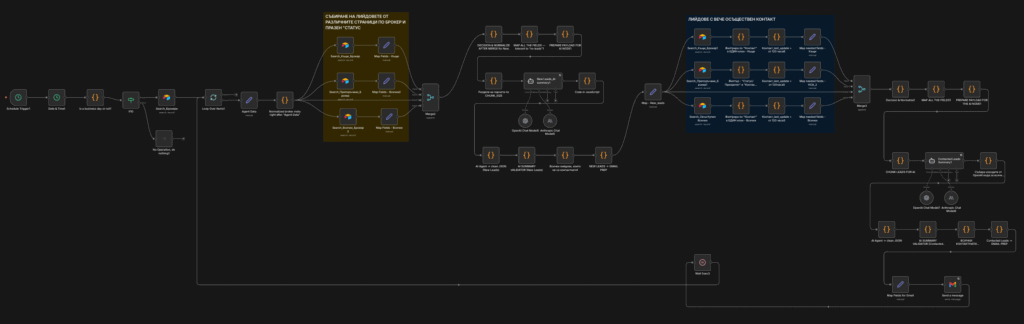
Solution 5: Daily Priority Emails for New Potential Clients and Follow-Ups
What problem does it solve for the client?
Even with a well-organized database, the same thing happens in an agent’s real workday: tasks pile up, potential clients come in from different places, and there’s no clear morning focus on who is “urgent” and who needs a follow-up call.
This leads to three critical problems.
- New clients aren’t handled in time, so they go cold or move on to a competitor.
- Follow-up becomes chaotic, with some clients contacted too late and others forgotten entirely.
- Agents’ time is wasted “digging” through lists and doing manual sorting instead of doing what matters most: making calls, scheduling meetings, and conducting viewings.
This automation solves all three problems by providing each agent with a ready daily action plan, with no manual sorting required.
How does the automation work, explained simply?
The core idea is this: at the start of the working day, each agent receives an email telling them exactly which clients to work with that day and what to do with them.
The system automatically surfaces two types of clients:
- new clients where speed is critical (“call immediately”),
- и clients due for a follow-up who can’t be allowed to slip through (“today’s follow-up list”).
For each follow-up client, the email includes a short AI-generated note of one to two sentences based on available data, such as purchase timeline, contact stage, and last communication channel, so the agent has context and a next step, not just a name and phone number.
What does the agent receive in the email?
The email is structured as a working brief:
- A prioritized follow-up client list with key data and a short strategy note
- A “New Clients” section for immediate action
- Ready-made questions and a conversation framework to speed up calls and raise the quality of communication
In short, instead of the agent thinking “where do I even start,” they begin the day with a ready structure.
The real benefit for the agency
- Faster response to new inquiries means fewer lost clients.
- Consistency in follow-up leads to higher conversion rates among contacts already collected.
- Less time on admin means more time selling; agents spend their time taking action rather than preparing to act.
- And a unified standard across the entire team means the daily focus becomes systematic, not dependent on memory and habits.
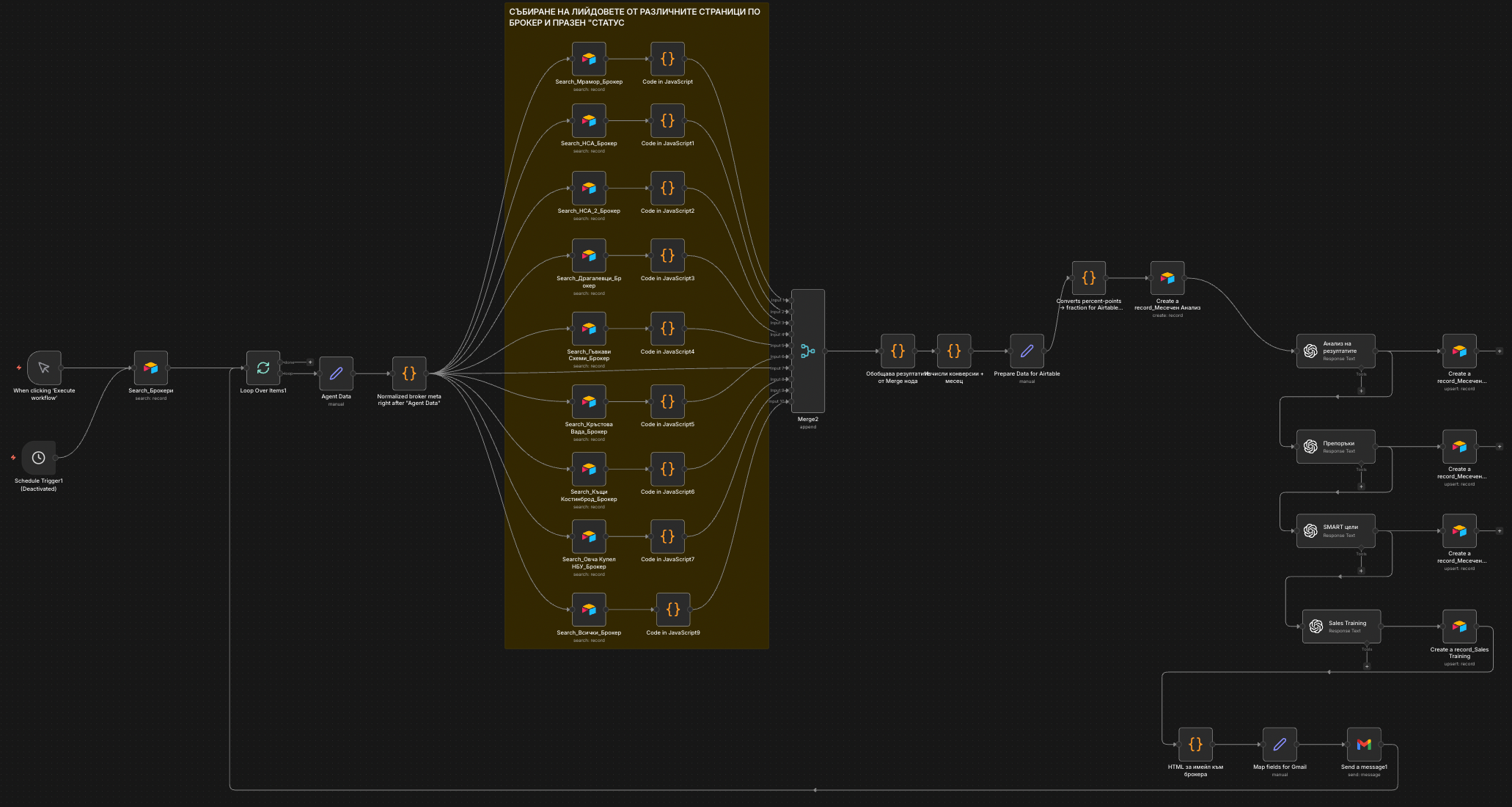
Solution 6: Monthly agent Performance Reports (KPIs + AI Analysis + SMART Goals + Training)
What problem does it solve for the client?
Once the database was organized and the daily priorities were running smoothly, one “quiet” problem remained that was holding back growth: there was no monthly control mechanism for results and team development.
Yes, there was data, but:
- Nobody was turning it into a clear monthly report
- Comparing performance against KPI targets was done “by eye” and often far too late
- Feedback to agents was inconsistent and subjective
- Weak points in the pipeline (Calls → Meetings or Meetings → Deposits) were only identified after the month had already ended
The result was predictable: some agents kept repeating the same mistakes, others were doing things right, but that knowledge never became a standard for the whole team.
Why was this automation necessary?
In a sales team, daily tasks alone aren’t enough.
If you want results to grow systematically, you need a process that every month:
- Measures performance objectively
- Shows where the bottleneck is
- Provides concrete direction
- Sets SMART goals for the next period
- And does all of this without demanding time from the manager
In other words, not just having a CRM, but having data-driven sales management.
How does the automation work?
The core idea is this: at the end of every month, the system automatically generates a report for each agent and sends it by email.
The automation:
- Collects each agent’s KPI results for the month (contacts, meetings, deposits, deals)
- Calculates the Calls → Meetings and Meetings → Deals conversion rates
- Feeds that data to AI, which generates four components: a short AI analysis (what the numbers show relative to targets), specific recommendations (tied to KPIs), SMART goals for the following month, and a micro-training module (only when there’s an actual performance gap)
- Saves all new data back into the database
- Sends each agent a personalized email with their monthly performance summary
This last point matters: the training content isn’t generated “just in case”; it’s only triggered when there’s a genuine need.
The real benefit for the agency
This solution closes the “data → action” loop and makes management systematic:
- KPI-based team management, not gut-feel management, every month it’s clear who is above or below target and why.
- A unified standard for evaluation and feedback, all agents are assessed the same way.
- Faster improvement of weak points: AI identifies exactly where the problem is and what needs to change.
- Time saved: reports are generated automatically, with no manual spreadsheets or write-ups.
- Performance history and trend analysis: Every monthly result is recorded and can be compared over time.
In short, instead of results being “checked,” they start being managed.
Final Results
After the solutions were implemented, the effect wasn’t just a “feeling”, it was a measurable change in the process.
Observed results:
- Significantly faster response to new potential clients (first contact was no longer delayed by days)
- Драматично намаляване на пропуснатите последващи обаждания
- Премахване на дублиращи се обаждания към един и същ клиент
- Пълна видимост в това какво прави всеки агент и къде се намира всеки клиент в процеса
- По-висока дисциплина при въвеждане на данни
- Намалено време, прекарано във вътрешна координация между агентите
- Реално увеличение на реализациите от “запитване” към “оглед” и “среща”.
Най-важното е, че агенцията вече не губеше клиенти поради организационен хаос; това се случваше само когато пазарът или бюджетът на клиента правеха сделката невъзможна.
Това е огромна разлика.
Наръчник (За Други Агенции за Недвижими Имоти)
Ако управлявате агенция за недвижими имоти и чувствате, че растете по-бързо, отколкото системите ви могат да се справят, ето една практическа рамка:
- Централизирайте базата данни, не създавайте нова таблица за всяка кампания.
- Определете задължителните полета за първия контакт.
- Въведете единен стандарт за регистриране на разговори.
- Отделете “стари” от “активни” клиенти.
- Изграждане на механизъм за автоматично откриване на дублиращи се записи.
- Дайте на агентите дневен списък с приоритети.
- Визуализирайте ключовите показатели за ефективност в табло, видимо за собственика.
- Автоматизирайте механични задачи, а не продажби.
- Стандартизирайте процеса, така че да не зависи от нито един човек.
- Изградете архитектура за растеж, а не временни решения.
Това не са просто технически стъпки. Това е начинът да превърнете хаоса в система и системата в предвидим растеж.
Ако се разпознавате в проблемите, описани в тази статия
Ето какво предлагам: а безплатна 1-часова консултация за стратегия където ще:
- Анализирайте текущата си структура (CRM, Sheets, работен процес)
- Определете къде губите клиенти и време
- Определете кои дейности могат да бъдат автоматизирани
- Изчислете кои автоматизации биха генерирали най-висока възвръщаемост на инвестициите за вашата агенция
Целта не е да ви продадем “автоматизация”.”
Целта е да ви покажем къде губите пари и как вашата система може да започне да работи за вас, вместо срещу вас.
Ако вашият бизнес расте, но процесите ви се затрудняват да бъдат в крак, вероятно е време за следващото ниво на структура и контрол.